> ## Documentation Index
> Fetch the complete documentation index at: https://bifrost-dev.mintlify.site/llms.txt
> Use this file to discover all available pages before exploring further.
# Budget and Limits
> Enterprise-grade budget management and cost control with hierarchical budget allocation through virtual keys, teams, and customers.
## Overview
Running multiple OSS Bifrost nodes with a Postgres backend is not supported.
Here is the short technical explanation:
* Bifrost is designed to keep all critical information in memory, including provider configs, API keys, budgets, usage, and traffic distribution.
* Once a node is initialized, it does not read this information back from the database.
* In the Enterprise version, we use a slightly modified version of RAFT to synchronize this state in real time across nodes, while the database acts only as a dumb store.
* Based on our current view, OSS is sufficient for startups and medium-scale teams, and can easily handle around 3,000–5,000 RPS on a single instance.
* If you need high availability and enterprise capabilities such as real-time synchronization, the Enterprise plan is the right fit.
* And yes, that is part of how we draw the OSS vs Enterprise line 💰.
Budgeting and rate limiting are a core feature of Bifrost's governance system managed through [Virtual Keys](./virtual-keys).
Bifrost's budget management system provides comprehensive cost control and financial governance for enterprise AI deployments. It operates through a **hierarchical budget structure** that enables granular cost management, usage tracking, and financial oversight across your entire organization.
**Core Hierarchy:**
```
Customer (has independent budget)
↓ (one-to-many)
Team (has independent budget)
↓ (one-to-many)
Virtual Key (has independent budget + rate limits)
↓ (one-to-many)
Provider Config (has independent budget + rate limits)
OR
Customer (has independent budget)
↓ (direct attachment)
Virtual Key (has independent budget + rate limits)
↓ (one-to-many)
Provider Config (has independent budget + rate limits)
OR
Virtual Key (standalone - has independent budget + rate limits)
↓ (one-to-many)
Provider Config (has independent budget + rate limits)
```
**Key Capabilities:**
* **Virtual Keys** - Primary access control via `x-bf-vk` header (exclusive team OR customer attachment)
* **Budget Management** - Independent budget limits at each hierarchy level with cumulative checking
* **Rate Limiting** - Request and token-based throttling at both VK and provider config levels
* **Provider-Level Governance** - Granular budgets and rate limits per AI provider within a virtual key
* **Model/Provider Filtering** - Granular access control per virtual key
* **Usage Tracking** - Real-time monitoring and audit trails
* **Audit Headers** - Optional team and customer identification
***
## Budget Management
### Cost Calculation
Bifrost automatically calculates costs based on:
* **Provider Pricing** - Real-time model pricing data
* **Token Usage** - Input + output tokens from API responses
* **Request Type** - Different pricing for chat, text, embedding, speech, transcription
* **Cache Status** - Reduced costs for cached responses
* **Batch Operations** - Volume discounts for batch requests
All cost calculation details are covered in [Architecture > Framework > Model Catalog](../../architecture/framework/model-catalog).
### Budget Checking Flow
When a request is made with a virtual key, Bifrost checks **all applicable budgets independently** in the hierarchy. Each budget must have sufficient remaining balance for the request to proceed.
**Checking Sequence:**
**For VK → Team → Customer:**
```
1. ✓ Provider Config Budget (if provider config has budget)
2. ✓ VK Budget (if VK has budget)
3. ✓ Team Budget (if VK's team has budget)
4. ✓ Customer Budget (if team's customer has budget)
```
**For VK → Customer (direct):**
```
1. ✓ Provider Config Budget (if provider config has budget)
2. ✓ VK Budget (if VK has budget)
3. ✓ Customer Budget (if VK's customer has budget)
```
**For Standalone VK:**
```
1. ✓ Provider Config Budget (if provider config has budget)
2. ✓ VK Budget (if VK has budget)
```
**Important Notes:**
* **All applicable budgets must pass** - any single budget failure blocks the request
* **Budgets are independent** - each tracks its own usage and limits
* **Costs are deducted from all applicable budgets** - same cost applied to each level
* **Rate limits checked at provider config and VK levels** - teams and customers have no rate limits
* **Provider selection** - providers that exceed their budget or rate limits are excluded from [routing](./routing)
**Example:**
```
- Provider config budget: $4/$5 remaining ✓
- VK budget: $9/$10 remaining ✓
- Team budget: $15/$20 remaining ✓
- Customer budget: $45/$50 remaining ✓
- Result: Allowed (no budget is exceeded)
- After request:
- Request cost: $2
- Updated Provider=$6/$5, VK=$11/$10, Team=$17/$20, Customer=$47/$50
- Then the next request will be blocked (both provider and VK budgets exceeded).
```
## Rate Limiting
Rate limits protect your system from abuse and manage traffic by setting thresholds on request frequency and token usage over a specific time window. Rate limits can be configured at **both the Virtual Key level and Provider Config level** for granular control.
Bifrost supports two types of rate limits that work in parallel:
* **Request Limits**: Control the maximum number of API calls that can be made within a set duration (e.g., 100 requests per minute).
* **Token Limits**: Control the maximum number of tokens (prompt + completion) that can be processed within a set duration (e.g., 50,000 tokens per hour).
### Rate Limit Hierarchy
Rate limits are checked in hierarchical order:
```
1. ✓ Provider Config Rate Limits (if provider config has rate limits)
2. ✓ Virtual Key Rate Limits (if VK has rate limits)
```
For a request to be allowed, it must pass both the request limit and token limit checks at **all applicable levels**. If a provider config exceeds its rate limits, that provider is excluded from routing, but other providers within the same virtual key remain available.
### Provider-Level Rate Limiting
Provider configs within a virtual key can have independent rate limits, enabling:
* **Per-Provider Throttling**: Different rate limits for OpenAI vs Anthropic
* **Provider Isolation**: Rate limit violations on one provider don't affect others
* **Granular Control**: Fine-tune limits based on provider capabilities and costs
## Reset Durations
Budgets and rate limits support flexible reset durations:
**Format Examples:**
* `1m` - 1 minute
* `5m` - 5 minutes
* `1h` - 1 hour
* `1d` - 1 day
* `1w` - 1 week
* `1M` - 1 month
* `1Q` - 1 quarter (budgets only)
* `1Y` - 1 year
**Common Patterns:**
* **Rate Limits**: `1m`, `1h`, `1d` for request throttling
* **Budgets**: `1d`, `1w`, `1M`, `1Q`, `1Y` for cost control
`1Q` is available on **budgets only**. Rate limits carry no quarter definition, so a quarterly token or request limit is not offered.
### Calendar-aligned budgets
By default, a budget **rolls**: after `reset_duration` elapses since `last_reset`, usage resets. With **`calendar_aligned`: `true`**, the budget resets at the **start of each calendar period in UTC** instead (same instant for every customer of that configuration).
**Supported `reset_duration` suffixes:** only day (`d`), week (`w`), month (`M`), quarter (`Q`), and year (`Y`). Examples: `1d` → midnight UTC each day; `1w` → Monday 00:00 UTC each week; `1M` → first day of each month; `1Q` → first day of the fiscal quarter; `1Y` → January 1 each year. Sub-day durations (for example `1h`, `30m`) have no calendar boundary to snap to. Setting `calendar_aligned` alongside one is **accepted rather than rejected**, and simply has no effect: that window keeps resetting on its rolling schedule.
Calendar alignment applies to budgets on **customers**, **teams**, **virtual keys**, and **per-provider-config** budgets. `calendar_aligned` is an **owner-level** field, not a per-budget one: send it at the top level of the customer, team, virtual key, or provider-governance request body, on both `POST` (create) and `PUT` (update). Omitting it on a `PUT` leaves the current setting unchanged.
The flag applies to **everything that owner resets**, not to budgets alone. That owner's [rate limits](#rate-limiting) follow the same rule, so its token and request counters align too.
It sets the alignment **mode**, not a shared reset instant. An owner holds one window per budget plus one each for its token and request counters, and every one of them keeps its own `reset_duration` and its own `last_reset`. Each aligns to **its own** boundary: on an aligned owner, a `1M` budget resets on the 1st while a `1d` token limit resets at midnight. They do not reset together.
Alignment only applies to durations that have a calendar boundary: `1d`, `1w`, `1M`, `1Q` and `1Y`. A **sub-day** window such as a `1h` request limit stays on its rolling schedule even when its owner is aligned, and the flag changes nothing for it.
Turning calendar alignment **on** for an existing owner **keeps its accumulated usage**. Each open window is adopted onto the calendar grid instead of being reset: its start moves forward to the boundary it now follows, its usage carries over untouched, and its first aligned reset happens at the **next** boundary.
So a monthly budget with $42 of spend, aligned on 5 February, keeps the $42 and resets on 1 March. Nothing is cleared at the switch, and nothing is forgiven.
Two details follow from each window being adopted on its own terms:
* **Windows do not move together.** A `1M` budget adopts the month boundary while a `1d` counter beside it adopts midnight.
* **Sub-day windows are not adopted at all**, because they have no boundary to adopt. A `1h` counter keeps its rolling schedule, as described above.
The boundary only ever moves **forward**. A window that already opened after its most recent boundary is current, so it is left exactly as it is. This forward-only rule is what keeps every node in a cluster agreeing on which window is open.
### Quarterly budgets and fiscal quarters
A quarterly budget uses the same rule as a monthly one - it resets on the **1st of a month at 00:00 UTC** - and only differs in *which* 1st. By default that is January, April, July and October. Set `reset_config.quarter_start_month` to move the fiscal year:
```json theme={null}
{
"id": "quarterly-spend",
"max_limit": 50000,
"reset_duration": "1Q",
"reset_config": { "quarter_start_month": 4 }
}
```
With April as the start, the quarters are **Q1 Apr-Jun · Q2 Jul-Sep · Q3 Oct-Dec · Q4 Jan-Mar**.
Quarter boundaries repeat every three months, so `quarter_start_month` only changes reset dates **modulo 3**. January, April, July and October all reset on the same days - which covers the UK and India (April), the US federal year (October) and Australia (July). For those, the setting changes only which quarter is labelled Q1, not when the budget resets. The eight other months genuinely move the boundaries: February, for example, gives Feb-Apr / May-Jul / Aug-Oct / Nov-Jan.
`reset_config` is valid **only** on a quarterly `reset_duration`; the API rejects it on any other window rather than storing a setting that would do nothing. A quarterly budget that is **not** calendar-aligned ignores the fiscal calendar entirely and rolls on a 90-day window anchored to its creation time.
Changing `quarter_start_month` on a live calendar-aligned budget takes effect on the next reset tick rather than instantly. The new definition is stored immediately, which moves where the current window starts; if that boundary has moved forward, the budget reads as due and resets shortly after, zeroing usage. That is the honest outcome - under the new calendar the current quarter genuinely began on a later date.
### Resetting budget usage
Changing a budget's amount or reset frequency does not clear the spend already recorded against it. To
clear it, send `reset_budget_usage: true` on the update request. The UI asks before saving whenever a
budget's configuration changed, offering **Preserve Usage** or **Reset Usage**.
```json theme={null}
{
"budgets": [{ "max_limit": 5000, "reset_duration": "1M" }],
"reset_budget_usage": true
}
```
Supported on virtual keys, teams, customers, model limits, and provider governance.
The reset clears **usage only**. The reset window keeps its existing start and end, because `last_reset`
only ever advances and never moves as a side effect of a configuration write. That rule is what keeps
every node in a cluster agreeing on which window is currently open. The normal scheduled reset is
unaffected and still advances `last_reset` when the window closes, so a manually cleared budget resets
again at its usual boundary rather than starting a fresh window from the moment you cleared it.
### Budget overrides
A budget can carry a temporary **override** that adds spending capacity on top of its configured limit without touching the base limit, current usage, or reset schedule. While an override is active, enforcement uses:
```text theme={null}
Effective limit = max_limit + override_amount
```
An override lasts either for a fixed number of reset cycles (the current cycle counts as the first) or until it is explicitly removed. Manage it from the virtual key's **Budget Information** panel, or through `PUT`/`DELETE` on `/api/governance/virtual-keys/{vk_id}/budgets/{budget_id}/override` — see [Budget Overrides](./virtual-keys#budget-overrides) for the UI walkthrough and API examples.
***
## Customer-scoped requests
Customer scoping is a **Bifrost Enterprise** feature. It applies to requests made with a **team-attached virtual key** when that team is linked to more than one customer.
In Enterprise deployments a team can be attached to multiple customers. By default, a request through a team's virtual key charges and enforces **every** customer the team belongs to. To attribute a single request to **one** specific customer, send a customer-scope header:
| Header | Description |
| -------------------- | ------------------------------------------------------ |
| `x-bf-customer-id` | The customer's ID. |
| `x-bf-customer-name` | The customer's display name (must be globally unique). |
When a scope header is present, only the named customer is charged, rate-limited, and recorded in that request's usage logs — the team's other customers are left untouched. The team's own budget, the virtual key budget, and provider-config limits are always enforced regardless of scope.
**Resolution rules:**
* `x-bf-customer-id` takes precedence over `x-bf-customer-name` when both are sent.
* Surrounding whitespace is trimmed, and the header name is **case-insensitive** (like all Bifrost headers).
* Send no customer-scope header to charge and enforce all of the team's customers (the default).
### Examples
Scope a chat request to a customer by ID:
```bash theme={null}
curl http://localhost:8080/v1/chat/completions \
-H "Content-Type: application/json" \
-H "x-bf-vk: " \
-H "x-bf-customer-id: cust_acme" \
-d '{"model": "gpt-4o", "messages": [{"role": "user", "content": "Hello"}]}'
```
Or scope by name instead:
```bash theme={null}
curl http://localhost:8080/v1/chat/completions \
-H "Content-Type: application/json" \
-H "x-bf-vk: " \
-H "x-bf-customer-name: Acme Corp" \
-d '{"model": "gpt-4o", "messages": [{"role": "user", "content": "Hello"}]}'
```
### Validation
The customer scope is validated **before** the request reaches a provider, and it **fails closed**: an invalid scope is rejected even when budget and rate-limit enforcement is otherwise skipped. A request is rejected with **400 Bad Request** when the scope header is:
* present but empty or whitespace-only,
* an ID or name that does not match any customer, or
* a customer that exists but is **not** attached to the virtual key's team.
**Example error response:**
```json theme={null}
{
"error": {
"message": "customer \"Acme Corp\" is not attached to this team"
}
}
```
***
## Configuration Guide
Configure provider-level budgets and rate limits using any of these methods:
The Bifrost Web UI provides an intuitive interface for configuring provider-level governance through the Virtual Keys management page.
### Creating Virtual Keys with Provider Configs
1. **Navigate to Virtual Keys**: Go to **Virtual Keys** page in the Bifrost dashboard
2. **Create New Virtual Key**: Click "Create Virtual Key" button
3. **Configure Providers**: In the "Provider Configurations" section:
* Add multiple providers with individual weights
* Set provider-specific budgets and rate limits
* Configure allowed models per provider
### Provider Configuration Interface
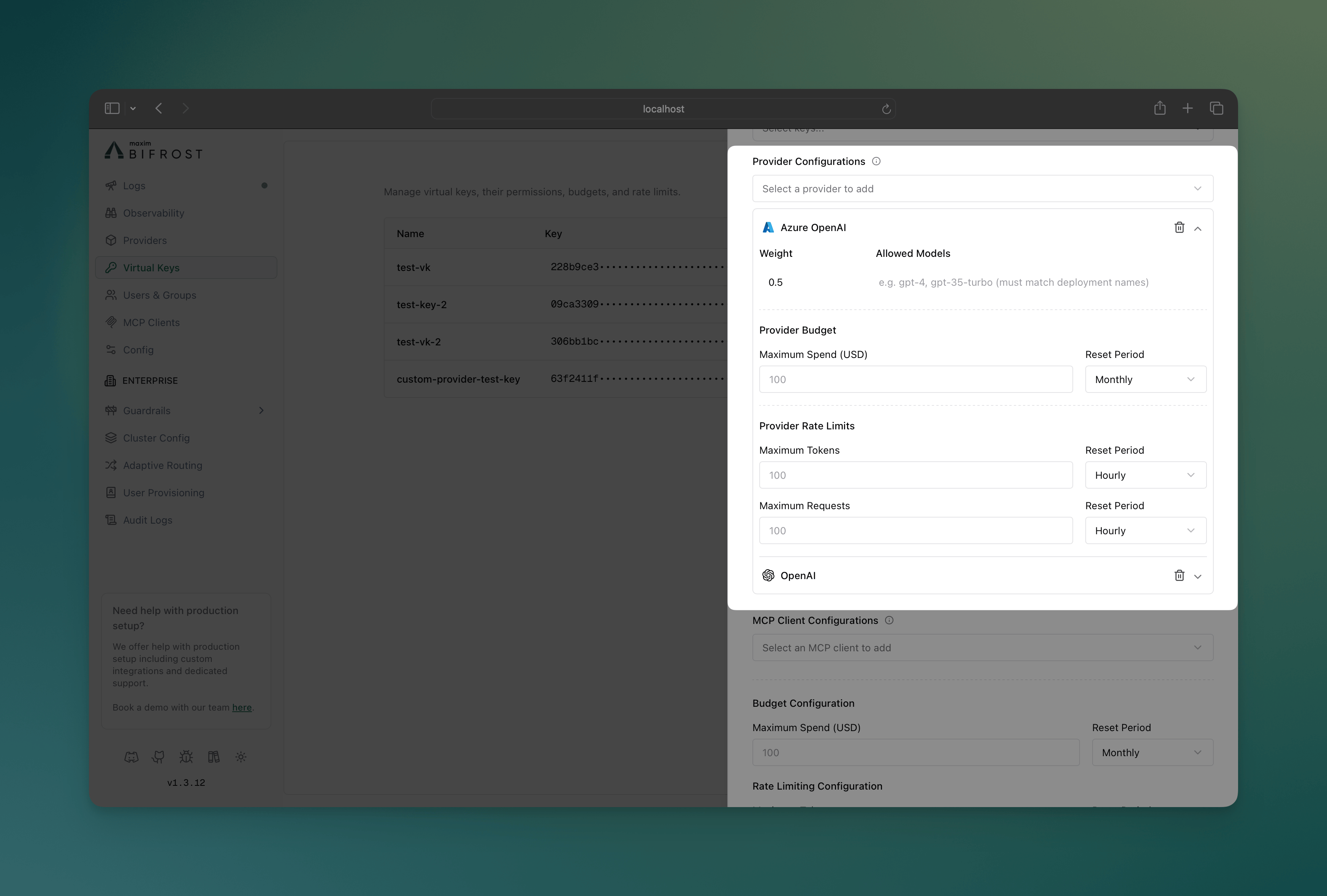 **Key Features:**
* **Visual Provider Cards**: Each provider displays as an expandable card
* **Budget Controls**: Set spending limits with reset periods per provider
* **Rate Limit Controls**: Configure token and request limits independently
* **Model Filtering**: Specify allowed models for each provider
* **Weight Distribution**: Visual indicators for load balancing weights
* **Real-time Validation**: Immediate feedback on configuration errors
### Monitoring Provider Usage
**Key Features:**
* **Visual Provider Cards**: Each provider displays as an expandable card
* **Budget Controls**: Set spending limits with reset periods per provider
* **Rate Limit Controls**: Configure token and request limits independently
* **Model Filtering**: Specify allowed models for each provider
* **Weight Distribution**: Visual indicators for load balancing weights
* **Real-time Validation**: Immediate feedback on configuration errors
### Monitoring Provider Usage
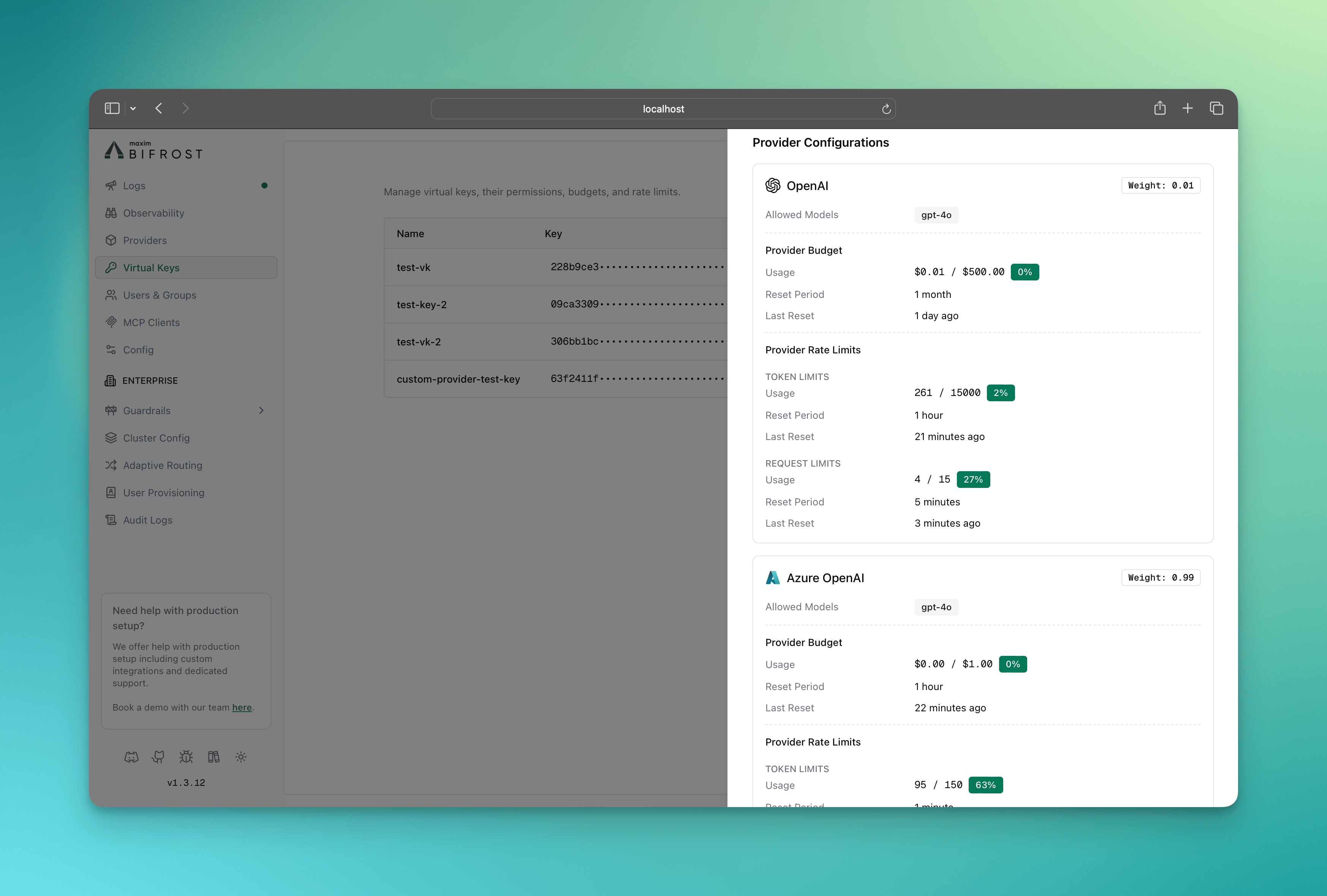 The info sheet for the virtual key provides real-time monitoring of:
* Budget consumption per provider
* Rate limit utilization (tokens and requests)
* Provider availability status
* Usage trends and forecasting
Use the Bifrost HTTP API to programmatically manage provider-level governance configurations.
### Create Virtual Key with Provider Configs
```bash theme={null}
curl -X POST "https://your-bifrost-instance.com/api/governance/virtual-keys" \
-H "Content-Type: application/json" \
-d '{
"name": "marketing-team-vk",
"description": "Marketing team virtual key with provider-specific limits",
"provider_configs": [
{
"provider": "openai",
"weight": 0.7,
"allowed_models": ["gpt-4", "gpt-3.5-turbo"],
"budget": {
"max_limit": 500.00,
"reset_duration": "1M",
"calendar_aligned": true
},
"rate_limit": {
"token_max_limit": 1000000,
"token_reset_duration": "1h",
"request_max_limit": 1000,
"request_reset_duration": "1h"
}
},
{
"provider": "anthropic",
"weight": 0.3,
"allowed_models": ["claude-3-opus", "claude-3-sonnet"],
"budget": {
"max_limit": 200.00,
"reset_duration": "1M"
},
"rate_limit": {
"token_max_limit": 500000,
"token_reset_duration": "1h",
"request_max_limit": 500,
"request_reset_duration": "1h"
}
}
],
"budget": {
"max_limit": 1000.00,
"reset_duration": "1M",
"calendar_aligned": true
},
"is_active": true
}'
```
Use `calendar_aligned` only with `d` / `w` / `M` / `Y` reset durations (see [Calendar-aligned budgets](#calendar-aligned-budgets)).
### Update Provider Configuration
```bash theme={null}
curl -X PUT "https://your-bifrost-instance.com/api/governance/virtual-keys/{vk_id}" \
-H "Content-Type: application/json" \
-d '{
"provider_configs": [
{
"id": 1,
"provider": "openai",
"weight": 0.8,
"budget": {
"max_limit": 600.00,
"reset_duration": "1M"
},
"rate_limit": {
"token_max_limit": 1200000,
"token_reset_duration": "1h"
}
}
]
}'
```
### API Response Structure
```json theme={null}
{
"message": "Virtual key created successfully",
"virtual_key": {
"id": "vk_123",
"name": "marketing-team-vk",
"value": "vk_abc123def456",
"provider_configs": [
{
"id": 1,
"provider": "openai",
"weight": 0.7,
"allowed_models": ["gpt-4", "gpt-3.5-turbo"],
"budget": {
"id": "budget_789",
"max_limit": 500.00,
"current_usage": 0.00,
"reset_duration": "1M",
"calendar_aligned": true,
"last_reset": "2024-01-01T00:00:00Z"
},
"rate_limit": {
"id": "rate_limit_456",
"token_max_limit": 1000000,
"token_current_usage": 0,
"token_reset_duration": "1h",
"token_last_reset": "2024-01-01T00:00:00Z",
"request_max_limit": 1000,
"request_current_usage": 0,
"request_reset_duration": "1h",
"request_last_reset": "2024-01-01T00:00:00Z"
}
}
]
}
}
```
### Field Descriptions
| Field | Type | Description |
| ------------------------------ | ------- | ------------------------------------------------------------------------------------ |
| `provider` | string | AI provider name (e.g., "openai", "anthropic") |
| `weight` | float | Load balancing weight (0.0-1.0) |
| `allowed_models` | array | Specific models allowed for this provider |
| `budget.max_limit` | float | Maximum spend in USD |
| `budget.reset_duration` | string | Reset period (e.g., "1h", "1d", "1M") |
| `budget.calendar_aligned` | boolean | When true, resets at calendar boundaries in UTC (requires `d`/`w`/`M`/`Y` durations) |
| `rate_limit.token_max_limit` | integer | Maximum tokens per period |
| `rate_limit.request_max_limit` | integer | Maximum requests per period |
Configure provider-level governance through Bifrost's configuration file for declarative management.
### Basic Configuration Structure
```json theme={null}
{
"governance": {
"virtual_keys": [
{
"id": "vk-dev-001",
"name": "development-team-vk",
"description": "Development team with multi-provider setup",
"is_active": true,
"rate_limit_id": "rl-vk-dev",
"provider_configs": [
{
"id": 1,
"provider": "openai",
"weight": 0.6,
"allowed_models": ["gpt-4", "gpt-3.5-turbo"],
"rate_limit_id": "rl-pc-openai"
},
{
"id": 2,
"provider": "anthropic",
"weight": 0.4,
"allowed_models": ["claude-3-opus", "claude-3-sonnet"],
"rate_limit_id": "rl-pc-anthropic"
}
]
}
],
"budgets": [
{
"id": "budget-vk-dev",
"virtual_key_id": "vk-dev-001",
"max_limit": 2000.00,
"reset_duration": "1M",
"calendar_aligned": true
},
{
"id": "budget-pc-openai",
"provider_config_id": 1,
"max_limit": 1000.00,
"reset_duration": "1M"
},
{
"id": "budget-pc-anthropic",
"provider_config_id": 2,
"max_limit": 500.00,
"reset_duration": "1M"
}
],
"rate_limits": [
{
"id": "rl-vk-dev",
"token_max_limit": 5000000,
"token_reset_duration": "1h",
"request_max_limit": 3000,
"request_reset_duration": "1h"
},
{
"id": "rl-pc-openai",
"token_max_limit": 2000000,
"token_reset_duration": "1h",
"request_max_limit": 2000,
"request_reset_duration": "1h"
},
{
"id": "rl-pc-anthropic",
"token_max_limit": 1000000,
"token_reset_duration": "1h",
"request_max_limit": 1000,
"request_reset_duration": "1h"
}
]
}
}
```
Budgets and rate limits live as **separate top-level arrays** inside `governance`. Virtual keys and provider configs reference them by id (`rate_limit_id`) or are referenced back (`virtual_key_id` / `provider_config_id` on each `budgets[]` entry). Optional `calendar_aligned` on each `budget` matches the HTTP API and [calendar-aligned behavior](#calendar-aligned-budgets).
### Advanced Configuration Examples
#### Cost-Optimized Setup
```json theme={null}
{
"governance": {
"virtual_keys": [
{
"id": "vk-cost-opt",
"name": "cost-optimized-vk",
"provider_configs": [
{"id": 10, "provider": "openai-gpt-3.5", "weight": 0.8, "rate_limit_id": "rl-cheap"},
{"id": 11, "provider": "openai-gpt-4", "weight": 0.2, "rate_limit_id": "rl-premium"}
]
}
],
"budgets": [
{"id": "b-cheap", "provider_config_id": 10, "max_limit": 50.00, "reset_duration": "1d"},
{"id": "b-premium", "provider_config_id": 11, "max_limit": 200.00, "reset_duration": "1d"}
],
"rate_limits": [
{"id": "rl-cheap", "request_max_limit": 1000, "request_reset_duration": "1h"},
{"id": "rl-premium", "request_max_limit": 100, "request_reset_duration": "1h"}
]
}
}
```
#### High-Volume Production Setup
```json theme={null}
{
"governance": {
"virtual_keys": [
{
"id": "vk-prod-hv",
"name": "production-high-volume-vk",
"provider_configs": [
{"id": 20, "provider": "openai", "weight": 0.5, "rate_limit_id": "rl-openai"},
{"id": 21, "provider": "anthropic", "weight": 0.3, "rate_limit_id": "rl-anthropic"},
{"id": 22, "provider": "azure-openai", "weight": 0.2, "rate_limit_id": "rl-azure"}
]
}
],
"budgets": [
{"id": "b-openai", "provider_config_id": 20, "max_limit": 5000.00, "reset_duration": "1M"},
{"id": "b-anthropic", "provider_config_id": 21, "max_limit": 3000.00, "reset_duration": "1M"},
{"id": "b-azure", "provider_config_id": 22, "max_limit": 2000.00, "reset_duration": "1M"}
],
"rate_limits": [
{"id": "rl-openai", "token_max_limit": 10000000, "token_reset_duration": "1h", "request_max_limit": 10000, "request_reset_duration": "1h"},
{"id": "rl-anthropic", "token_max_limit": 6000000, "token_reset_duration": "1h", "request_max_limit": 6000, "request_reset_duration": "1h"},
{"id": "rl-azure", "token_max_limit": 4000000, "token_reset_duration": "1h", "request_max_limit": 4000, "request_reset_duration": "1h"}
]
}
}
```
**Validation Rules:**
* Budget limits must be positive numbers
* Reset durations must be valid time formats
* Rate limits must be positive integers
* Provider names must match configured providers
## Provider-Level Governance Examples
### Example 1: Mixed Provider Budgets
A virtual key configured with multiple providers and different budget allocations:
```json theme={null}
{
"governance": {
"virtual_keys": [
{
"id": "vk-mkt",
"name": "marketing-team-vk",
"provider_configs": [
{"id": 30, "provider": "openai", "weight": 0.7},
{"id": 31, "provider": "anthropic", "weight": 0.3}
]
}
],
"budgets": [
{"id": "b-vk-mkt", "virtual_key_id": "vk-mkt", "max_limit": 100, "reset_duration": "1M"},
{"id": "b-openai", "provider_config_id": 30, "max_limit": 50, "reset_duration": "1M"},
{"id": "b-anth", "provider_config_id": 31, "max_limit": 30, "reset_duration": "1M"}
]
}
}
```
**Behavior:**
* OpenAI requests limited to 50 dollars/month at provider level + 100 dollars/month at VK level
* Anthropic requests limited to 30 dollars/month at provider level + 100 dollars/month at VK level
* If any provider's budget is exhausted, all requests to that provider will be blocked
### Example 2: Provider-Specific Rate Limits
Different rate limits based on provider capabilities:
```json theme={null}
{
"governance": {
"virtual_keys": [
{
"id": "vk-hv",
"name": "high-volume-vk",
"provider_configs": [
{"id": 40, "provider": "openai", "rate_limit_id": "rl-openai"},
{"id": 41, "provider": "anthropic", "rate_limit_id": "rl-anthropic"}
]
}
],
"rate_limits": [
{"id": "rl-openai", "request_max_limit": 1000, "request_reset_duration": "1h", "token_max_limit": 1000000, "token_reset_duration": "1h"},
{"id": "rl-anthropic", "request_max_limit": 500, "request_reset_duration": "1h", "token_max_limit": 500000, "token_reset_duration": "1h"}
]
}
}
```
**Behavior:**
* OpenAI: 1000 requests/hour, 1M tokens/hour
* Anthropic: 500 requests/hour, 500K tokens/hour
* If any provider's rate limits are exceeded, all requests to that provider will be blocked
### Example 3: Failover Strategy
Provider configurations with budget-based failover:
```json theme={null}
{
"governance": {
"virtual_keys": [
{
"id": "vk-cost",
"name": "cost-optimized-vk",
"provider_configs": [
{"id": 50, "provider": "openai-cheap", "weight": 1.0},
{"id": 51, "provider": "openai-premium", "weight": 0.0, "rate_limit_id": "rl-premium"}
]
}
],
"budgets": [
{"id": "b-cheap", "provider_config_id": 50, "max_limit": 10, "reset_duration": "1d"},
{"id": "b-premium", "provider_config_id": 51, "max_limit": 50, "reset_duration": "1d"}
],
"rate_limits": [
{"id": "rl-premium", "request_max_limit": 100, "request_reset_duration": "1h", "token_max_limit": 50000, "token_reset_duration": "1h"}
]
}
}
```
**Behavior:**
* Primary: Use cheap provider until \$10 daily budget exhausted
* Fallback: Automatically switch to premium provider when cheap option unavailable. To enable this, you should not send `provider` name in the request body, read [Routing](./routing#automatic-fallbacks) for more details.
* Cost containment: Prevent unexpected overspend on premium resources and limit the number of requests to the premium provider
## Key Benefits of Provider-Level Governance
* **Granular Control**: Set specific spending limits and rate limits per AI provider
* **Automatic Fallback**: Route to alternative providers when budgets or rate limits are exceeded
* **Cost Control**: Track and control spending by provider for better financial oversight
* **Performance Testing**: A/B testing across providers with controlled budgets
* **Multi-Provider Strategies**: Primary/backup provider configurations
* **Cost-Tiered Access**: Cheap providers for basic tasks, premium for complex workloads
***
## Next Steps
* **[Routing](./routing)** - Direct requests to specific AI models, providers, and keys using Virtual Keys.
* **[MCP Tool Filtering](./mcp-tools)** - Manage MCP clients/tools for virtual keys.
* **[Tracing](../observability/default)** - Audit trails and request tracking
The info sheet for the virtual key provides real-time monitoring of:
* Budget consumption per provider
* Rate limit utilization (tokens and requests)
* Provider availability status
* Usage trends and forecasting
Use the Bifrost HTTP API to programmatically manage provider-level governance configurations.
### Create Virtual Key with Provider Configs
```bash theme={null}
curl -X POST "https://your-bifrost-instance.com/api/governance/virtual-keys" \
-H "Content-Type: application/json" \
-d '{
"name": "marketing-team-vk",
"description": "Marketing team virtual key with provider-specific limits",
"provider_configs": [
{
"provider": "openai",
"weight": 0.7,
"allowed_models": ["gpt-4", "gpt-3.5-turbo"],
"budget": {
"max_limit": 500.00,
"reset_duration": "1M",
"calendar_aligned": true
},
"rate_limit": {
"token_max_limit": 1000000,
"token_reset_duration": "1h",
"request_max_limit": 1000,
"request_reset_duration": "1h"
}
},
{
"provider": "anthropic",
"weight": 0.3,
"allowed_models": ["claude-3-opus", "claude-3-sonnet"],
"budget": {
"max_limit": 200.00,
"reset_duration": "1M"
},
"rate_limit": {
"token_max_limit": 500000,
"token_reset_duration": "1h",
"request_max_limit": 500,
"request_reset_duration": "1h"
}
}
],
"budget": {
"max_limit": 1000.00,
"reset_duration": "1M",
"calendar_aligned": true
},
"is_active": true
}'
```
Use `calendar_aligned` only with `d` / `w` / `M` / `Y` reset durations (see [Calendar-aligned budgets](#calendar-aligned-budgets)).
### Update Provider Configuration
```bash theme={null}
curl -X PUT "https://your-bifrost-instance.com/api/governance/virtual-keys/{vk_id}" \
-H "Content-Type: application/json" \
-d '{
"provider_configs": [
{
"id": 1,
"provider": "openai",
"weight": 0.8,
"budget": {
"max_limit": 600.00,
"reset_duration": "1M"
},
"rate_limit": {
"token_max_limit": 1200000,
"token_reset_duration": "1h"
}
}
]
}'
```
### API Response Structure
```json theme={null}
{
"message": "Virtual key created successfully",
"virtual_key": {
"id": "vk_123",
"name": "marketing-team-vk",
"value": "vk_abc123def456",
"provider_configs": [
{
"id": 1,
"provider": "openai",
"weight": 0.7,
"allowed_models": ["gpt-4", "gpt-3.5-turbo"],
"budget": {
"id": "budget_789",
"max_limit": 500.00,
"current_usage": 0.00,
"reset_duration": "1M",
"calendar_aligned": true,
"last_reset": "2024-01-01T00:00:00Z"
},
"rate_limit": {
"id": "rate_limit_456",
"token_max_limit": 1000000,
"token_current_usage": 0,
"token_reset_duration": "1h",
"token_last_reset": "2024-01-01T00:00:00Z",
"request_max_limit": 1000,
"request_current_usage": 0,
"request_reset_duration": "1h",
"request_last_reset": "2024-01-01T00:00:00Z"
}
}
]
}
}
```
### Field Descriptions
| Field | Type | Description |
| ------------------------------ | ------- | ------------------------------------------------------------------------------------ |
| `provider` | string | AI provider name (e.g., "openai", "anthropic") |
| `weight` | float | Load balancing weight (0.0-1.0) |
| `allowed_models` | array | Specific models allowed for this provider |
| `budget.max_limit` | float | Maximum spend in USD |
| `budget.reset_duration` | string | Reset period (e.g., "1h", "1d", "1M") |
| `budget.calendar_aligned` | boolean | When true, resets at calendar boundaries in UTC (requires `d`/`w`/`M`/`Y` durations) |
| `rate_limit.token_max_limit` | integer | Maximum tokens per period |
| `rate_limit.request_max_limit` | integer | Maximum requests per period |
Configure provider-level governance through Bifrost's configuration file for declarative management.
### Basic Configuration Structure
```json theme={null}
{
"governance": {
"virtual_keys": [
{
"id": "vk-dev-001",
"name": "development-team-vk",
"description": "Development team with multi-provider setup",
"is_active": true,
"rate_limit_id": "rl-vk-dev",
"provider_configs": [
{
"id": 1,
"provider": "openai",
"weight": 0.6,
"allowed_models": ["gpt-4", "gpt-3.5-turbo"],
"rate_limit_id": "rl-pc-openai"
},
{
"id": 2,
"provider": "anthropic",
"weight": 0.4,
"allowed_models": ["claude-3-opus", "claude-3-sonnet"],
"rate_limit_id": "rl-pc-anthropic"
}
]
}
],
"budgets": [
{
"id": "budget-vk-dev",
"virtual_key_id": "vk-dev-001",
"max_limit": 2000.00,
"reset_duration": "1M",
"calendar_aligned": true
},
{
"id": "budget-pc-openai",
"provider_config_id": 1,
"max_limit": 1000.00,
"reset_duration": "1M"
},
{
"id": "budget-pc-anthropic",
"provider_config_id": 2,
"max_limit": 500.00,
"reset_duration": "1M"
}
],
"rate_limits": [
{
"id": "rl-vk-dev",
"token_max_limit": 5000000,
"token_reset_duration": "1h",
"request_max_limit": 3000,
"request_reset_duration": "1h"
},
{
"id": "rl-pc-openai",
"token_max_limit": 2000000,
"token_reset_duration": "1h",
"request_max_limit": 2000,
"request_reset_duration": "1h"
},
{
"id": "rl-pc-anthropic",
"token_max_limit": 1000000,
"token_reset_duration": "1h",
"request_max_limit": 1000,
"request_reset_duration": "1h"
}
]
}
}
```
Budgets and rate limits live as **separate top-level arrays** inside `governance`. Virtual keys and provider configs reference them by id (`rate_limit_id`) or are referenced back (`virtual_key_id` / `provider_config_id` on each `budgets[]` entry). Optional `calendar_aligned` on each `budget` matches the HTTP API and [calendar-aligned behavior](#calendar-aligned-budgets).
### Advanced Configuration Examples
#### Cost-Optimized Setup
```json theme={null}
{
"governance": {
"virtual_keys": [
{
"id": "vk-cost-opt",
"name": "cost-optimized-vk",
"provider_configs": [
{"id": 10, "provider": "openai-gpt-3.5", "weight": 0.8, "rate_limit_id": "rl-cheap"},
{"id": 11, "provider": "openai-gpt-4", "weight": 0.2, "rate_limit_id": "rl-premium"}
]
}
],
"budgets": [
{"id": "b-cheap", "provider_config_id": 10, "max_limit": 50.00, "reset_duration": "1d"},
{"id": "b-premium", "provider_config_id": 11, "max_limit": 200.00, "reset_duration": "1d"}
],
"rate_limits": [
{"id": "rl-cheap", "request_max_limit": 1000, "request_reset_duration": "1h"},
{"id": "rl-premium", "request_max_limit": 100, "request_reset_duration": "1h"}
]
}
}
```
#### High-Volume Production Setup
```json theme={null}
{
"governance": {
"virtual_keys": [
{
"id": "vk-prod-hv",
"name": "production-high-volume-vk",
"provider_configs": [
{"id": 20, "provider": "openai", "weight": 0.5, "rate_limit_id": "rl-openai"},
{"id": 21, "provider": "anthropic", "weight": 0.3, "rate_limit_id": "rl-anthropic"},
{"id": 22, "provider": "azure-openai", "weight": 0.2, "rate_limit_id": "rl-azure"}
]
}
],
"budgets": [
{"id": "b-openai", "provider_config_id": 20, "max_limit": 5000.00, "reset_duration": "1M"},
{"id": "b-anthropic", "provider_config_id": 21, "max_limit": 3000.00, "reset_duration": "1M"},
{"id": "b-azure", "provider_config_id": 22, "max_limit": 2000.00, "reset_duration": "1M"}
],
"rate_limits": [
{"id": "rl-openai", "token_max_limit": 10000000, "token_reset_duration": "1h", "request_max_limit": 10000, "request_reset_duration": "1h"},
{"id": "rl-anthropic", "token_max_limit": 6000000, "token_reset_duration": "1h", "request_max_limit": 6000, "request_reset_duration": "1h"},
{"id": "rl-azure", "token_max_limit": 4000000, "token_reset_duration": "1h", "request_max_limit": 4000, "request_reset_duration": "1h"}
]
}
}
```
**Validation Rules:**
* Budget limits must be positive numbers
* Reset durations must be valid time formats
* Rate limits must be positive integers
* Provider names must match configured providers
## Provider-Level Governance Examples
### Example 1: Mixed Provider Budgets
A virtual key configured with multiple providers and different budget allocations:
```json theme={null}
{
"governance": {
"virtual_keys": [
{
"id": "vk-mkt",
"name": "marketing-team-vk",
"provider_configs": [
{"id": 30, "provider": "openai", "weight": 0.7},
{"id": 31, "provider": "anthropic", "weight": 0.3}
]
}
],
"budgets": [
{"id": "b-vk-mkt", "virtual_key_id": "vk-mkt", "max_limit": 100, "reset_duration": "1M"},
{"id": "b-openai", "provider_config_id": 30, "max_limit": 50, "reset_duration": "1M"},
{"id": "b-anth", "provider_config_id": 31, "max_limit": 30, "reset_duration": "1M"}
]
}
}
```
**Behavior:**
* OpenAI requests limited to 50 dollars/month at provider level + 100 dollars/month at VK level
* Anthropic requests limited to 30 dollars/month at provider level + 100 dollars/month at VK level
* If any provider's budget is exhausted, all requests to that provider will be blocked
### Example 2: Provider-Specific Rate Limits
Different rate limits based on provider capabilities:
```json theme={null}
{
"governance": {
"virtual_keys": [
{
"id": "vk-hv",
"name": "high-volume-vk",
"provider_configs": [
{"id": 40, "provider": "openai", "rate_limit_id": "rl-openai"},
{"id": 41, "provider": "anthropic", "rate_limit_id": "rl-anthropic"}
]
}
],
"rate_limits": [
{"id": "rl-openai", "request_max_limit": 1000, "request_reset_duration": "1h", "token_max_limit": 1000000, "token_reset_duration": "1h"},
{"id": "rl-anthropic", "request_max_limit": 500, "request_reset_duration": "1h", "token_max_limit": 500000, "token_reset_duration": "1h"}
]
}
}
```
**Behavior:**
* OpenAI: 1000 requests/hour, 1M tokens/hour
* Anthropic: 500 requests/hour, 500K tokens/hour
* If any provider's rate limits are exceeded, all requests to that provider will be blocked
### Example 3: Failover Strategy
Provider configurations with budget-based failover:
```json theme={null}
{
"governance": {
"virtual_keys": [
{
"id": "vk-cost",
"name": "cost-optimized-vk",
"provider_configs": [
{"id": 50, "provider": "openai-cheap", "weight": 1.0},
{"id": 51, "provider": "openai-premium", "weight": 0.0, "rate_limit_id": "rl-premium"}
]
}
],
"budgets": [
{"id": "b-cheap", "provider_config_id": 50, "max_limit": 10, "reset_duration": "1d"},
{"id": "b-premium", "provider_config_id": 51, "max_limit": 50, "reset_duration": "1d"}
],
"rate_limits": [
{"id": "rl-premium", "request_max_limit": 100, "request_reset_duration": "1h", "token_max_limit": 50000, "token_reset_duration": "1h"}
]
}
}
```
**Behavior:**
* Primary: Use cheap provider until \$10 daily budget exhausted
* Fallback: Automatically switch to premium provider when cheap option unavailable. To enable this, you should not send `provider` name in the request body, read [Routing](./routing#automatic-fallbacks) for more details.
* Cost containment: Prevent unexpected overspend on premium resources and limit the number of requests to the premium provider
## Key Benefits of Provider-Level Governance
* **Granular Control**: Set specific spending limits and rate limits per AI provider
* **Automatic Fallback**: Route to alternative providers when budgets or rate limits are exceeded
* **Cost Control**: Track and control spending by provider for better financial oversight
* **Performance Testing**: A/B testing across providers with controlled budgets
* **Multi-Provider Strategies**: Primary/backup provider configurations
* **Cost-Tiered Access**: Cheap providers for basic tasks, premium for complex workloads
***
## Next Steps
* **[Routing](./routing)** - Direct requests to specific AI models, providers, and keys using Virtual Keys.
* **[MCP Tool Filtering](./mcp-tools)** - Manage MCP clients/tools for virtual keys.
* **[Tracing](../observability/default)** - Audit trails and request tracking