> ## Documentation Index
> Fetch the complete documentation index at: https://bifrost-dev.mintlify.site/llms.txt
> Use this file to discover all available pages before exploring further.
# Per-User Headers
> Each end-user submits their own HTTP headers (API key, signed token, tenant ID) for the MCP server. Lazy-auth model, no upstream OAuth required.
## Overview
Per-user headers is available in **Bifrost v1.5.4 and above**.
`auth_type: "per_user_headers"` lets each end-user supply their own HTTP headers for an upstream MCP server. The admin declares the **header names** that callers must fill in; each end-user submits their **values** the first time they hit the server. Bifrost stores one credential per `(identity, mcp_client)` and reuses it on every later call.
Use this when the upstream MCP server authenticates with per-user API keys, signed tokens, or any other static-shape credential — but does **not** offer OAuth (which would call for [Per-User OAuth](./per-user-oauth)).
This auth type is only valid for **HTTP** and **SSE** connections.
| | Headers (`headers`) | Per-User Headers (`per_user_headers`) |
| ------------------- | ----------------------------- | ------------------------------------------------- |
| Who supplies values | Admin, once at setup | Each end-user, lazily |
| Where values live | MCP client config (encrypted) | Per-credential rows keyed by identity (encrypted) |
| Admin declares | Header names + values | Header names only (schema) |
| Identity required | No | Yes (VK, signed-in user, or session ID) |
***
## How it works
The lazy-auth model is identical to [Per-User OAuth](./per-user-oauth) — the only difference is what the user is asked for at the consent page:
1. Caller sends a request with an identity (header or SSO).
2. The LLM (or MCP client) asks to invoke a tool on a `per_user_headers` server.
3. Bifrost looks up an existing credential for `(identity, mcp_client)`:
* **Found and `active`** → Bifrost attaches the stored header values and calls upstream.
* **Missing, `orphaned`, or `needs_update`** → Bifrost returns an `mcp_auth_required` payload with an inline `submit_url`. The tool is **not** executed.
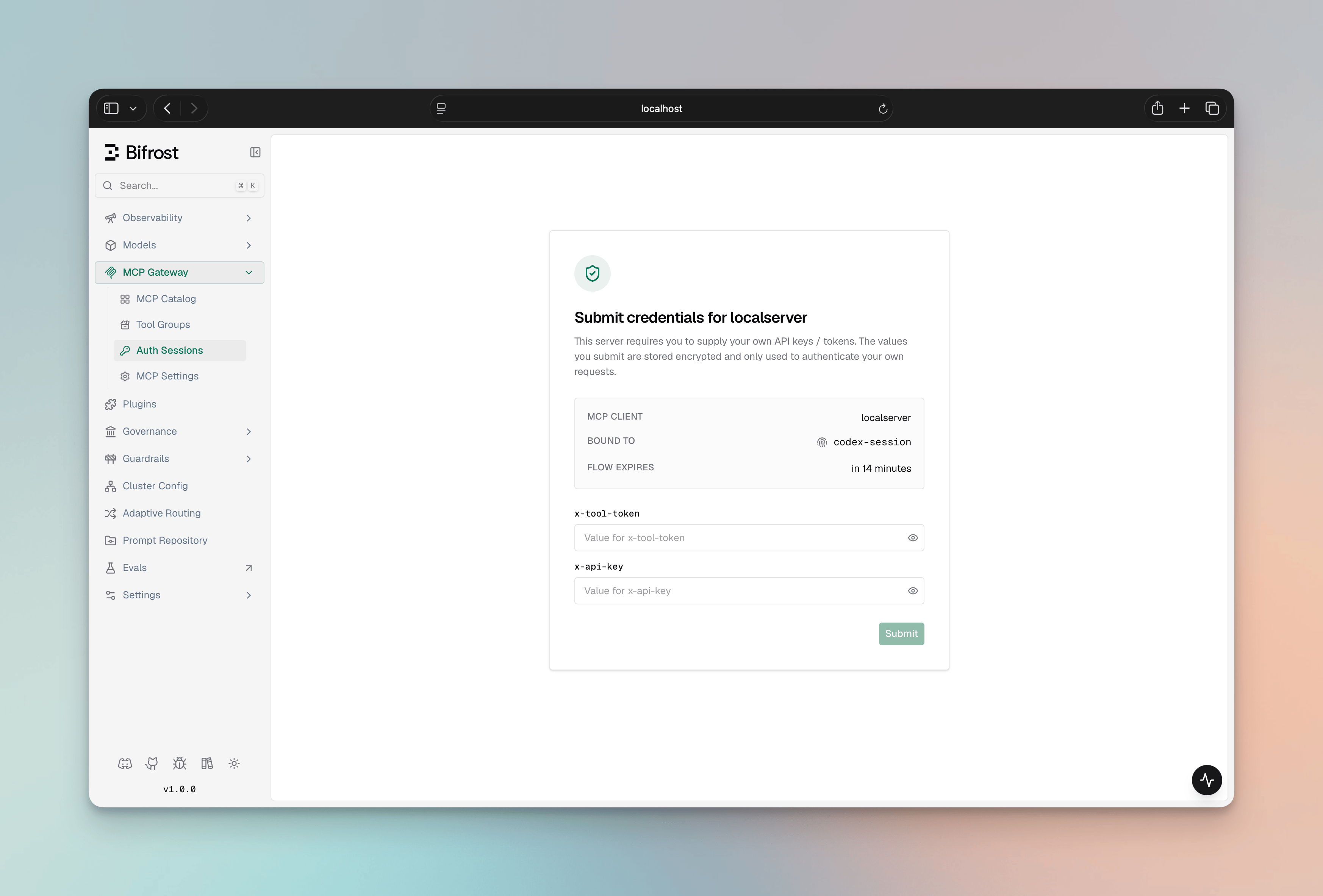
4. The user opens the URL, sees a Bifrost form listing the required header names, fills in values, and submits.
5. Bifrost runs a one-time upstream verify with the submitted values, then stores the credential.
6. The next request executes the tool normally.
The `mcp_auth_required` payload carries `kind: "headers"` so SDKs can branch on it. The natural-language message also embeds the URL so plain-text clients see it:
```text theme={null}
Authentication required for acme_api. Open this URL to submit the required headers: https://your-bifrost-domain.com/workspace/mcp-sessions/auth?flow=&kind=headers
```
VK and session-mode URLs may also carry a `#t=` fragment when [`mcp_enable_temp_token_auth`](./overview#the-mcp_enable_temp_token_auth-toggle) is turned on, letting anonymous browser visitors complete the form without a dashboard session (the fragment never reaches server logs). User-mode URLs never carry a temp token — visitors must complete SSO login first, and only the bound SSO user can finish the flow. See [Flow mode and access rules](./overview#flow-mode-and-access-rules).
 ***
## Setup
The admin configures the MCP client once, declaring the schema (header names) end-users will need to fill in. During setup, Bifrost asks the admin for sample values, runs a one-time upstream verify, and discovers the tool list — same as the per-user OAuth setup pattern, just with a values form instead of an OAuth popup. When verification runs through the `verify-headers` flow, the sample values are retained as the [admin discovery credential](#admin-discovery-credential) used to keep the tool list fresh; values passed inline on the create call are still used once and discarded.
1. Navigate to **MCP Gateway** in the sidebar
2. Click **New MCP Server**
3. Pick **HTTP** or **SSE** as the connection type, fill in the **Connection URL**
4. Set **Auth Type** to **Per-User Headers**
5. Fill in **Required Headers** — comma-separated list of header names each caller must supply (e.g. `X-API-Key, X-Tenant-ID`). Values are submitted per-user — never stored on this MCP config.
6. (Optional) Fill in **Static Headers** — admin-set headers that accompany every per-user request (e.g. a fixed tenant ID). These are visible to plugins; the per-user values aren't.
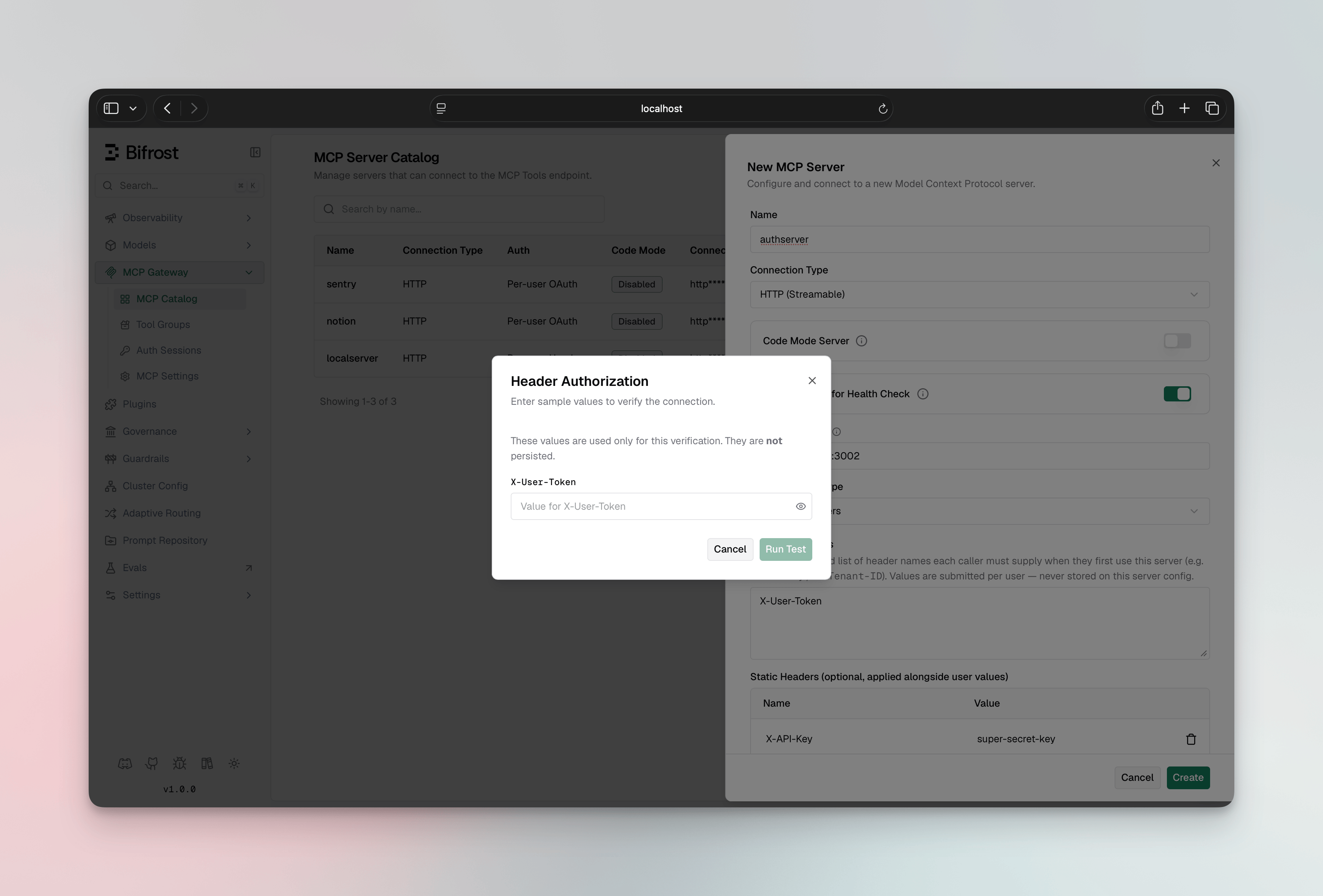
7. Click **Create** — a dialog opens asking for sample header values to run a one-time verify
8. Enter sample values, click **Run Test**
9. On success, the MCP client is persisted with the discovered tool list
***
## Setup
The admin configures the MCP client once, declaring the schema (header names) end-users will need to fill in. During setup, Bifrost asks the admin for sample values, runs a one-time upstream verify, and discovers the tool list — same as the per-user OAuth setup pattern, just with a values form instead of an OAuth popup. When verification runs through the `verify-headers` flow, the sample values are retained as the [admin discovery credential](#admin-discovery-credential) used to keep the tool list fresh; values passed inline on the create call are still used once and discarded.
1. Navigate to **MCP Gateway** in the sidebar
2. Click **New MCP Server**
3. Pick **HTTP** or **SSE** as the connection type, fill in the **Connection URL**
4. Set **Auth Type** to **Per-User Headers**
5. Fill in **Required Headers** — comma-separated list of header names each caller must supply (e.g. `X-API-Key, X-Tenant-ID`). Values are submitted per-user — never stored on this MCP config.
6. (Optional) Fill in **Static Headers** — admin-set headers that accompany every per-user request (e.g. a fixed tenant ID). These are visible to plugins; the per-user values aren't.
7. Click **Create** — a dialog opens asking for sample header values to run a one-time verify
8. Enter sample values, click **Run Test**
9. On success, the MCP client is persisted with the discovered tool list
 ```bash theme={null}
curl -X POST http://localhost:8080/api/mcp/client \
-H "Content-Type: application/json" \
-d '{
"name": "acme_api",
"connection_type": "http",
"connection_string": "https://api.acme.example.com/mcp",
"auth_type": "per_user_headers",
"per_user_header_keys": ["X-API-Key", "X-Tenant-ID"],
"user_headers": {
"X-API-Key": "your-admin-sample-key",
"X-Tenant-ID": "your-admin-sample-tenant"
},
"headers": {
"X-Region": { "value": "us-east-1" }
},
"tools_to_execute": ["*"]
}'
```
| Field | Type | Purpose |
| ---------------------- | ------------------- | --------------------------------------------------------------------------------------------------------------------------------------------------------------------------------------------- |
| `per_user_header_keys` | `string[]` | Required header names end-users must supply. The schema. |
| `user_headers` | `map[string]string` | Admin's sample values for the one-time verify. Discarded after the create call; only the [`verify-headers` flow](#admin-discovery-credential) retains them as the admin discovery credential. |
| `headers` | `map[string]EnvVar` | Optional static admin headers that accompany every per-user request. |
On success, Bifrost runs the upstream verify with `user_headers`, attaches the discovered tools, persists the MCP client, and returns:
```json theme={null}
{
"status": "success",
"message": "MCP client registered. 12 tools discovered. Each user will submit their own headers on first tool use."
}
```
If the verify fails, the call returns `422 Unprocessable Entity` with the upstream error — nothing is persisted.
Declare the client with `auth_type: "per_user_headers"` and the required header-name schema. The admin's sample values aren't included in config.json — they're collected by the UI when verification runs.
```json theme={null}
{
"mcp": {
"client_configs": [
{
"name": "acme_api",
"connection_type": "http",
"connection_string": "https://api.acme.example.com/mcp",
"auth_type": "per_user_headers",
"per_user_header_keys": ["X-API-Key", "X-Tenant-ID"],
"headers": {
"X-Region": "us-east-1"
},
"tools_to_execute": ["*"]
}
]
}
}
```
At boot the client lands in **`pending_verification`** state. From the MCP Gateway UI, open the client and click **Verify** — Bifrost opens the same sample-values dialog the Web UI Create flow uses. Submit values, the upstream verify runs, tools are discovered, the values are retained as the [admin discovery credential](#admin-discovery-credential) for later tool-list refresh, and the client transitions to `healthy`.
The same step is scriptable — no browser involved:
```bash theme={null}
curl -X POST http://localhost:8080/api/mcp/client/{id}/verify-headers \
-H "Content-Type: application/json" \
-d '{
"user_headers": {
"X-API-Key": "sample-admin-key",
"X-Tenant-ID": "verification-tenant"
}
}'
```
`user_headers` must cover every declared key. On success the response carries `tools_count` and the client transitions to `healthy`; a `422` means the upstream verify failed (retry with different values). A `409` means the client was already verified and its [admin discovery credential](#admin-discovery-credential) is healthy (or absent), so there is nothing to re-verify. The one legitimate repeat call is a repair: while the admin credential sits in `needs_update`, the endpoint accepts fresh sample values and flips the credential back to `active` on success.
**Lifecycle across restarts and config edits:** the verified state (discovered tools) is server-side and survives restarts and config.json re-syncs, including edits to `per_user_header_keys` — new keys apply to end-user submissions without re-verification. The key list cannot be *emptied*, though: an edit that removes all keys is ignored and the stored keys kept (with a warning at boot). Immutable fields — `auth_type`, `connection_type`, `connection_string`, `stdio_config` — cannot be changed after creation: file edits to them are ignored with a boot warning, matching the update API. Delete the client and re-declare it to change them.
***
## Static admin headers
`per_user_headers` clients can carry both:
* **Per-user values** — what each end-user submits (e.g., `X-API-Key`, `X-Tenant-ID`)
* **Static admin headers** — what the admin sets once and is sent on every per-user request (e.g., `X-Region`, `X-Tenant-Class`)
There is a strict separation between the two:
1. Static admin headers are **not** allowed to override per-user header names. If `X-API-Key` appears in both `per_user_header_keys` and `headers`, the static value is dropped on the wire — the per-user value wins.
2. `Authorization` is treated as a credential by Bifrost and is **never** exposed to connect-plugins or accidentally leaked.
3. Static admin headers are visible to connect-plugins (so a plugin can read e.g. `X-Region` and mutate it); per-user values aren't.
***
## Editing the schema
If the admin later changes `per_user_header_keys` (adds, removes, or renames a required header), all existing credentials for that MCP server flip to `needs_update`. End-users will see an `mcp_auth_required` payload on the next tool call and be sent back to the submission form to fill in the new schema. Their old values are preserved where the key still matches — the form pre-shows which keys are already on file (names only, never values). The retained [admin discovery credential](#admin-discovery-credential) flips to `needs_update` too, which surfaces as a `needs_reauth` badge on the client until the admin re-runs verification with values for the new schema.
1. Open the MCP client in the **MCP Gateway** registry
2. Click **Edit**
3. Update **Required Headers**
4. Click **Save**
```bash theme={null}
curl -X POST http://localhost:8080/api/mcp/client \
-H "Content-Type: application/json" \
-d '{
"name": "acme_api",
"connection_type": "http",
"connection_string": "https://api.acme.example.com/mcp",
"auth_type": "per_user_headers",
"per_user_header_keys": ["X-API-Key", "X-Tenant-ID"],
"user_headers": {
"X-API-Key": "your-admin-sample-key",
"X-Tenant-ID": "your-admin-sample-tenant"
},
"headers": {
"X-Region": { "value": "us-east-1" }
},
"tools_to_execute": ["*"]
}'
```
| Field | Type | Purpose |
| ---------------------- | ------------------- | --------------------------------------------------------------------------------------------------------------------------------------------------------------------------------------------- |
| `per_user_header_keys` | `string[]` | Required header names end-users must supply. The schema. |
| `user_headers` | `map[string]string` | Admin's sample values for the one-time verify. Discarded after the create call; only the [`verify-headers` flow](#admin-discovery-credential) retains them as the admin discovery credential. |
| `headers` | `map[string]EnvVar` | Optional static admin headers that accompany every per-user request. |
On success, Bifrost runs the upstream verify with `user_headers`, attaches the discovered tools, persists the MCP client, and returns:
```json theme={null}
{
"status": "success",
"message": "MCP client registered. 12 tools discovered. Each user will submit their own headers on first tool use."
}
```
If the verify fails, the call returns `422 Unprocessable Entity` with the upstream error — nothing is persisted.
Declare the client with `auth_type: "per_user_headers"` and the required header-name schema. The admin's sample values aren't included in config.json — they're collected by the UI when verification runs.
```json theme={null}
{
"mcp": {
"client_configs": [
{
"name": "acme_api",
"connection_type": "http",
"connection_string": "https://api.acme.example.com/mcp",
"auth_type": "per_user_headers",
"per_user_header_keys": ["X-API-Key", "X-Tenant-ID"],
"headers": {
"X-Region": "us-east-1"
},
"tools_to_execute": ["*"]
}
]
}
}
```
At boot the client lands in **`pending_verification`** state. From the MCP Gateway UI, open the client and click **Verify** — Bifrost opens the same sample-values dialog the Web UI Create flow uses. Submit values, the upstream verify runs, tools are discovered, the values are retained as the [admin discovery credential](#admin-discovery-credential) for later tool-list refresh, and the client transitions to `healthy`.
The same step is scriptable — no browser involved:
```bash theme={null}
curl -X POST http://localhost:8080/api/mcp/client/{id}/verify-headers \
-H "Content-Type: application/json" \
-d '{
"user_headers": {
"X-API-Key": "sample-admin-key",
"X-Tenant-ID": "verification-tenant"
}
}'
```
`user_headers` must cover every declared key. On success the response carries `tools_count` and the client transitions to `healthy`; a `422` means the upstream verify failed (retry with different values). A `409` means the client was already verified and its [admin discovery credential](#admin-discovery-credential) is healthy (or absent), so there is nothing to re-verify. The one legitimate repeat call is a repair: while the admin credential sits in `needs_update`, the endpoint accepts fresh sample values and flips the credential back to `active` on success.
**Lifecycle across restarts and config edits:** the verified state (discovered tools) is server-side and survives restarts and config.json re-syncs, including edits to `per_user_header_keys` — new keys apply to end-user submissions without re-verification. The key list cannot be *emptied*, though: an edit that removes all keys is ignored and the stored keys kept (with a warning at boot). Immutable fields — `auth_type`, `connection_type`, `connection_string`, `stdio_config` — cannot be changed after creation: file edits to them are ignored with a boot warning, matching the update API. Delete the client and re-declare it to change them.
***
## Static admin headers
`per_user_headers` clients can carry both:
* **Per-user values** — what each end-user submits (e.g., `X-API-Key`, `X-Tenant-ID`)
* **Static admin headers** — what the admin sets once and is sent on every per-user request (e.g., `X-Region`, `X-Tenant-Class`)
There is a strict separation between the two:
1. Static admin headers are **not** allowed to override per-user header names. If `X-API-Key` appears in both `per_user_header_keys` and `headers`, the static value is dropped on the wire — the per-user value wins.
2. `Authorization` is treated as a credential by Bifrost and is **never** exposed to connect-plugins or accidentally leaked.
3. Static admin headers are visible to connect-plugins (so a plugin can read e.g. `X-Region` and mutate it); per-user values aren't.
***
## Editing the schema
If the admin later changes `per_user_header_keys` (adds, removes, or renames a required header), all existing credentials for that MCP server flip to `needs_update`. End-users will see an `mcp_auth_required` payload on the next tool call and be sent back to the submission form to fill in the new schema. Their old values are preserved where the key still matches — the form pre-shows which keys are already on file (names only, never values). The retained [admin discovery credential](#admin-discovery-credential) flips to `needs_update` too, which surfaces as a `needs_reauth` badge on the client until the admin re-runs verification with values for the new schema.
1. Open the MCP client in the **MCP Gateway** registry
2. Click **Edit**
3. Update **Required Headers**
4. Click **Save**
 Existing per-user rows flip to `needs_update`. The next tool call from each user triggers a fresh submission.
```bash theme={null}
curl -X PUT http://localhost:8080/api/mcp/client/mcp_client_abc123 \
-H "Content-Type: application/json" \
-d '{
"per_user_header_keys": ["X-API-Key", "X-Tenant-ID", "X-Workspace"]
}'
```
***
## End-user submission flow
When an end-user hits the inline-401 URL, they land on `/workspace/mcp-sessions/auth?flow=&kind=headers`:
1. The page shows:
* Which **MCP server** is asking for values
* Which **identity** the resulting credential will be bound to (VK name, signed-in user, or session ID)
* One input per **required header** name
* Any **static admin headers** (names only) so the user knows what context their values will accompany
2. The user fills in values and clicks **Submit**
3. Bifrost runs a one-time upstream verify against the live MCP client config
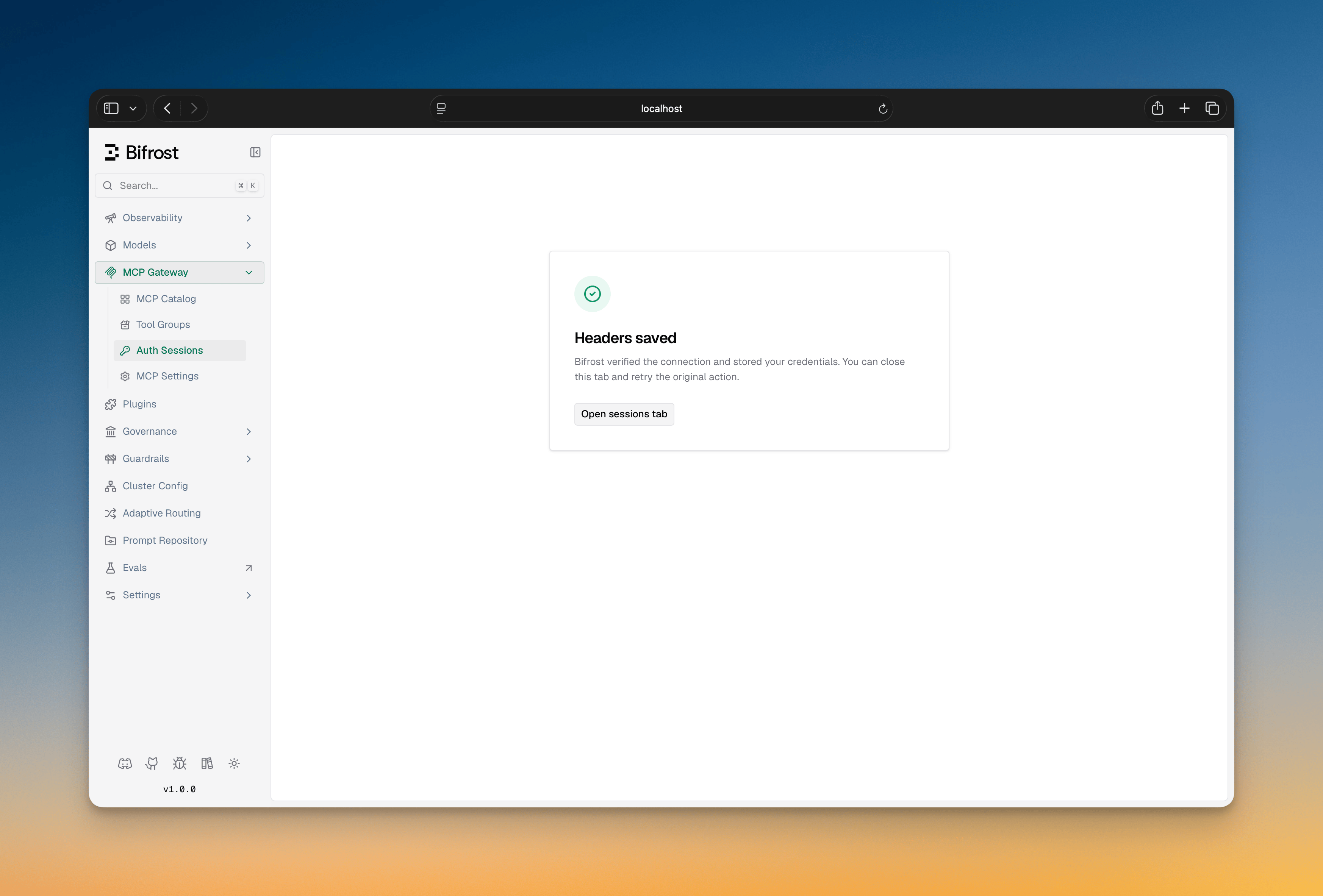
4. On success, the credential is persisted; the user sees a "Headers saved" confirmation and can close the tab
5. On failure (bad key, upstream rejected), the page shows the error and offers **Retry**
Existing per-user rows flip to `needs_update`. The next tool call from each user triggers a fresh submission.
```bash theme={null}
curl -X PUT http://localhost:8080/api/mcp/client/mcp_client_abc123 \
-H "Content-Type: application/json" \
-d '{
"per_user_header_keys": ["X-API-Key", "X-Tenant-ID", "X-Workspace"]
}'
```
***
## End-user submission flow
When an end-user hits the inline-401 URL, they land on `/workspace/mcp-sessions/auth?flow=&kind=headers`:
1. The page shows:
* Which **MCP server** is asking for values
* Which **identity** the resulting credential will be bound to (VK name, signed-in user, or session ID)
* One input per **required header** name
* Any **static admin headers** (names only) so the user knows what context their values will accompany
2. The user fills in values and clicks **Submit**
3. Bifrost runs a one-time upstream verify against the live MCP client config
4. On success, the credential is persisted; the user sees a "Headers saved" confirmation and can close the tab
5. On failure (bad key, upstream rejected), the page shows the error and offers **Retry**
 ***
## Identity modes
Same model as [Per-User OAuth](./per-user-oauth#identity-modes) — `user` > `vk` > `session`. A per-user-headers request with no identity is rejected with an inline-401 explaining the caller must send a VK, sign in, or set `x-bf-mcp-session-id`.
***
## Cross-gateway sharing
Header credentials are stored against an identity, not a gateway. The same identity reaching either gateway reuses the credential. See [Per-User OAuth — Cross-gateway sharing](./per-user-oauth#cross-gateway-token-sharing) — the model is identical.
***
## Lifecycle and sessions
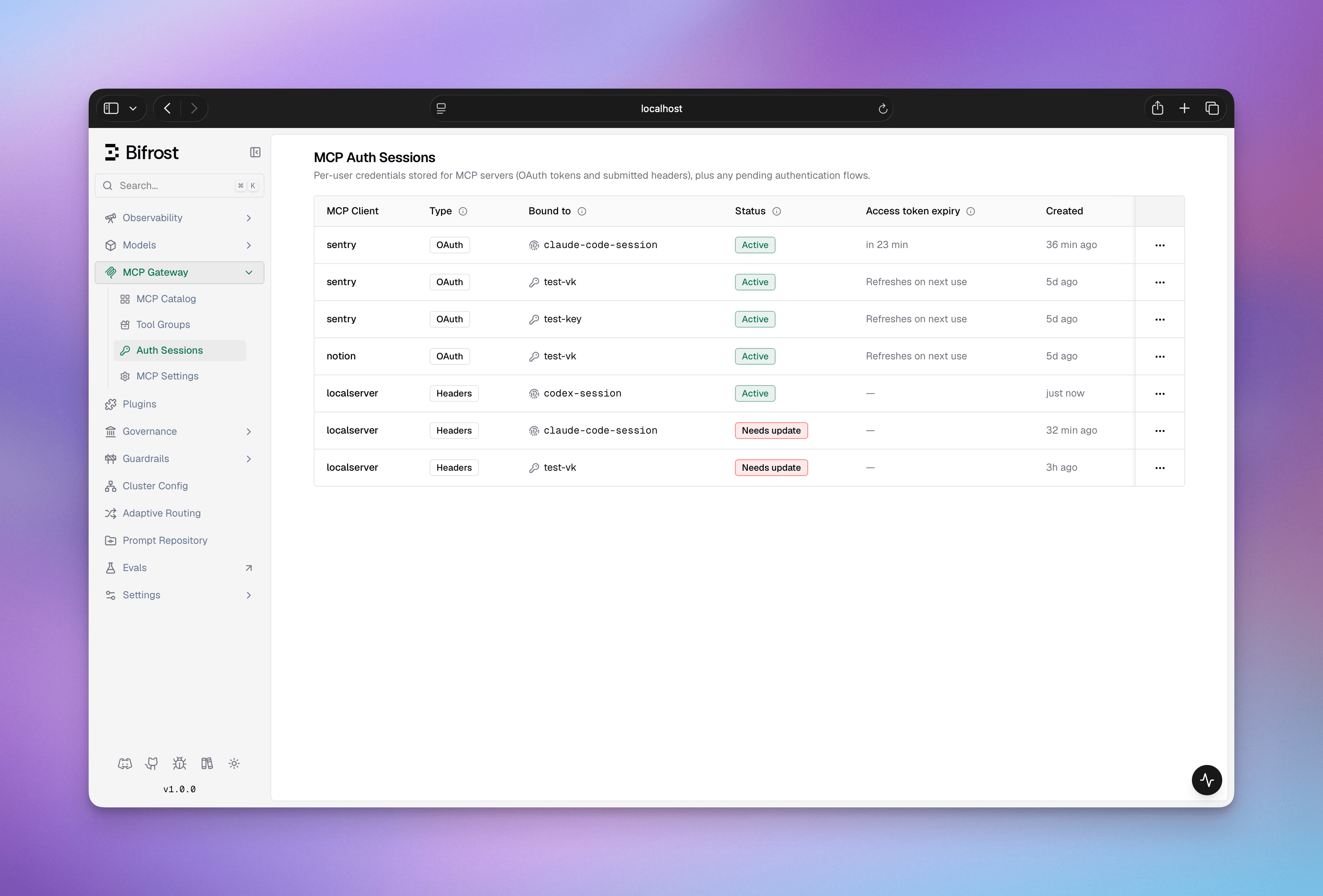
Every per-user header credential shows up on the **MCP Sessions** page with one of these statuses:
| State | Badge | Meaning |
| -------------- | ------------ | ------------------------------------------------------------------------------------------------------------------- |
| `active` | Active | Credential present and usable. Bifrost attaches the stored values on every call. |
| `needs_update` | Needs update | Admin changed `per_user_header_keys`. Credential is preserved; user must resubmit to satisfy the new schema. |
| `orphaned` | Orphaned | The caller's VK lost access to this MCP (e.g. AP change). Credential preserved; auto-reactivates if access returns. |
From the sessions table the user can **Edit values** (mints a fresh submission flow against the same MCP/identity) or **Revoke** outright. See [MCP Sessions](../sessions) for the full lifecycle and the orphan/reactivate behavior on VK changes.
The client-level [admin discovery credential](#admin-discovery-credential) is deliberately excluded from this page: it is not an end-user credential, and it is managed from the client sheet instead.
***
## Admin discovery credential
When admin verification runs through the `verify-headers` flow (the **Verify** dialog on a `pending_verification` client, or the endpoint directly), the sample values are retained as a client-level **admin discovery credential** (auth mode `admin`). Its role is deliberately narrow:
* **Tool-list refresh only.** The periodic tool syncer uses it for a one-shot connect, `tools/list`, disconnect cycle on the client's [tool sync interval](#periodic-tool-sync). It is **never** used for end-user tool calls; those always run under the caller's own submitted values.
* **Invisible on the sessions page.** Admin credentials are excluded from [MCP Sessions](../sessions); they are managed from the client sheet instead.
If the credential falls into `needs_update` (typically because `per_user_header_keys` changed), the client list projects a **`needs_reauth`** badge next to the client's **View sessions** link. This is a display-level state: end-user credentials and tool calls keep working, only tool-list refresh pauses until an admin repairs it. Clients created with inline `user_headers` before running `verify-headers` have no admin row and simply stay healthy (their tool list just cannot refresh periodically).
To repair it, open the client sheet and click **Update headers**: the same sample-values dialog re-runs the upstream verify, re-discovers tools, and flips the credential back to `active`. The scriptable equivalent is a repeat `POST /api/mcp/client/{id}/verify-headers` call, which is accepted while the admin credential sits in `needs_update` (any other repeat returns `409`).
***
## Identity modes
Same model as [Per-User OAuth](./per-user-oauth#identity-modes) — `user` > `vk` > `session`. A per-user-headers request with no identity is rejected with an inline-401 explaining the caller must send a VK, sign in, or set `x-bf-mcp-session-id`.
***
## Cross-gateway sharing
Header credentials are stored against an identity, not a gateway. The same identity reaching either gateway reuses the credential. See [Per-User OAuth — Cross-gateway sharing](./per-user-oauth#cross-gateway-token-sharing) — the model is identical.
***
## Lifecycle and sessions
Every per-user header credential shows up on the **MCP Sessions** page with one of these statuses:
| State | Badge | Meaning |
| -------------- | ------------ | ------------------------------------------------------------------------------------------------------------------- |
| `active` | Active | Credential present and usable. Bifrost attaches the stored values on every call. |
| `needs_update` | Needs update | Admin changed `per_user_header_keys`. Credential is preserved; user must resubmit to satisfy the new schema. |
| `orphaned` | Orphaned | The caller's VK lost access to this MCP (e.g. AP change). Credential preserved; auto-reactivates if access returns. |
From the sessions table the user can **Edit values** (mints a fresh submission flow against the same MCP/identity) or **Revoke** outright. See [MCP Sessions](../sessions) for the full lifecycle and the orphan/reactivate behavior on VK changes.
The client-level [admin discovery credential](#admin-discovery-credential) is deliberately excluded from this page: it is not an end-user credential, and it is managed from the client sheet instead.
***
## Admin discovery credential
When admin verification runs through the `verify-headers` flow (the **Verify** dialog on a `pending_verification` client, or the endpoint directly), the sample values are retained as a client-level **admin discovery credential** (auth mode `admin`). Its role is deliberately narrow:
* **Tool-list refresh only.** The periodic tool syncer uses it for a one-shot connect, `tools/list`, disconnect cycle on the client's [tool sync interval](#periodic-tool-sync). It is **never** used for end-user tool calls; those always run under the caller's own submitted values.
* **Invisible on the sessions page.** Admin credentials are excluded from [MCP Sessions](../sessions); they are managed from the client sheet instead.
If the credential falls into `needs_update` (typically because `per_user_header_keys` changed), the client list projects a **`needs_reauth`** badge next to the client's **View sessions** link. This is a display-level state: end-user credentials and tool calls keep working, only tool-list refresh pauses until an admin repairs it. Clients created with inline `user_headers` before running `verify-headers` have no admin row and simply stay healthy (their tool list just cannot refresh periodically).
To repair it, open the client sheet and click **Update headers**: the same sample-values dialog re-runs the upstream verify, re-discovers tools, and flips the credential back to `active`. The scriptable equivalent is a repeat `POST /api/mcp/client/{id}/verify-headers` call, which is accepted while the admin credential sits in `needs_update` (any other repeat returns `409`).
 ### Periodic tool sync
Per-user clients hold no persistent upstream connection, but their tool list still refreshes on a schedule using the admin discovery credential. The cadence follows the per-client `tool_sync_interval` (minutes, on the create/update API):
* **Positive**: sync every N minutes for this client
* **`0` / unset**: inherit the global `mcp_tool_sync_interval` client setting (minutes, default 10)
* **Negative**: disable periodic sync for this client
A failed sync keeps the existing tool set and retries on the next cycle. In `config.json`, the field also accepts duration strings such as `"10m"` (recommended); a bare number there is a legacy nanosecond value, unlike the API which takes minutes.
Every sync's result persists to the database (skipped when it's byte-identical to what's already stored), so a restart doesn't revert the tool list to whatever was discovered at the client's original bootstrap verification.
***
## Configuration reference
```json theme={null}
{
"name": "acme_api",
"connection_type": "http",
"connection_string": "https://api.acme.example.com/mcp",
"auth_type": "per_user_headers",
"per_user_header_keys": ["X-API-Key", "X-Tenant-ID"],
"headers": {
"X-Region": "us-east-1"
},
"tools_to_execute": ["*"]
}
```
| Field | Type | Notes |
| ---------------------- | ------------------- | -------------------------------------------------------------------------------------------------------------------------------------------------------------------------------------------------------------- |
| `auth_type` | string | `"per_user_headers"` |
| `per_user_header_keys` | `string[]` | Required header names. Must be non-empty. |
| `headers` | `map[string]EnvVar` | Optional static admin headers. |
| `user_headers` | `map[string]string` | **Create-only**: admin sample values for the upstream verify; not persisted on the create path. The [`verify-headers` flow](#admin-discovery-credential) retains its values as the admin discovery credential. |
MCP client names cannot contain hyphens — Bifrost prefixes tools as `-` and uses the hyphen to split the two halves at execution time.
***
## Troubleshooting
The admin sample values you supplied (`user_headers`) didn't pass upstream auth. Double-check the value spelling (some upstreams care about prefixes like `Bearer ` or hex casing), then retry.
The VK isn't resolving. Confirm the VK exists and the caller is sending it under one of `x-bf-vk`, `Authorization: Bearer …`, `x-api-key`, or `x-goog-api-key`. If you're behind a proxy that strips `Authorization`, switch the caller to `x-bf-vk`.
Pending submission flows have a 15-minute TTL. Trigger the original action again to mint a fresh flow.
Make sure Bifrost can build a public URL — if behind a proxy, set `mcp_external_client_url` so the redirect lands on the right host.
***
## Next Steps
* [Per-User OAuth](./per-user-oauth) — when the upstream provides OAuth
* [Headers](./headers) — when one admin key fits everyone
* [MCP Sessions](../sessions) — credential lifecycle, orphan/reactivate, revoke
* [MCP Gateway Mode](../gateway) — expose Bifrost as an MCP server for Claude Code / Cursor
### Periodic tool sync
Per-user clients hold no persistent upstream connection, but their tool list still refreshes on a schedule using the admin discovery credential. The cadence follows the per-client `tool_sync_interval` (minutes, on the create/update API):
* **Positive**: sync every N minutes for this client
* **`0` / unset**: inherit the global `mcp_tool_sync_interval` client setting (minutes, default 10)
* **Negative**: disable periodic sync for this client
A failed sync keeps the existing tool set and retries on the next cycle. In `config.json`, the field also accepts duration strings such as `"10m"` (recommended); a bare number there is a legacy nanosecond value, unlike the API which takes minutes.
Every sync's result persists to the database (skipped when it's byte-identical to what's already stored), so a restart doesn't revert the tool list to whatever was discovered at the client's original bootstrap verification.
***
## Configuration reference
```json theme={null}
{
"name": "acme_api",
"connection_type": "http",
"connection_string": "https://api.acme.example.com/mcp",
"auth_type": "per_user_headers",
"per_user_header_keys": ["X-API-Key", "X-Tenant-ID"],
"headers": {
"X-Region": "us-east-1"
},
"tools_to_execute": ["*"]
}
```
| Field | Type | Notes |
| ---------------------- | ------------------- | -------------------------------------------------------------------------------------------------------------------------------------------------------------------------------------------------------------- |
| `auth_type` | string | `"per_user_headers"` |
| `per_user_header_keys` | `string[]` | Required header names. Must be non-empty. |
| `headers` | `map[string]EnvVar` | Optional static admin headers. |
| `user_headers` | `map[string]string` | **Create-only**: admin sample values for the upstream verify; not persisted on the create path. The [`verify-headers` flow](#admin-discovery-credential) retains its values as the admin discovery credential. |
MCP client names cannot contain hyphens — Bifrost prefixes tools as `-` and uses the hyphen to split the two halves at execution time.
***
## Troubleshooting
The admin sample values you supplied (`user_headers`) didn't pass upstream auth. Double-check the value spelling (some upstreams care about prefixes like `Bearer ` or hex casing), then retry.
The VK isn't resolving. Confirm the VK exists and the caller is sending it under one of `x-bf-vk`, `Authorization: Bearer …`, `x-api-key`, or `x-goog-api-key`. If you're behind a proxy that strips `Authorization`, switch the caller to `x-bf-vk`.
Pending submission flows have a 15-minute TTL. Trigger the original action again to mint a fresh flow.
Make sure Bifrost can build a public URL — if behind a proxy, set `mcp_external_client_url` so the redirect lands on the right host.
***
## Next Steps
* [Per-User OAuth](./per-user-oauth) — when the upstream provides OAuth
* [Headers](./headers) — when one admin key fits everyone
* [MCP Sessions](../sessions) — credential lifecycle, orphan/reactivate, revoke
* [MCP Gateway Mode](../gateway) — expose Bifrost as an MCP server for Claude Code / Cursor