
Overview

Bifrost Enterprise connects your organization’s identity provider to Bifrost through OAuth 2.0 / OIDC login, provider-backed directory sync, and inbound SCIM 2.0 provisioning. A single configuration gives you:
  • Single sign-on (SSO) via OAuth 2.0 / OIDC with JWKS-based JWT validation
  • Automatic role assignment using custom claims, app roles, or group-to-role mappings
  • Team synchronization from IdP groups into Bifrost teams
  • Business unit mapping from IdP attributes to Bifrost business units
  • Bulk user provisioning with filter-preview before import
  • Background lifecycle reconciliation every 24 hours for imported users
  • OIDC session refresh checks every 15 minutes to confirm users are still active with the IdP
  • Silent token refresh using server-stored refresh tokens when the user remains active
  • Inbound SCIM 2.0 — IdPs can push user and group changes to Bifrost in real time via the /scim/v2 API
Once configured, users sign in to Bifrost with their corporate credentials and inherit the right role and permissions immediately — no manual account creation.
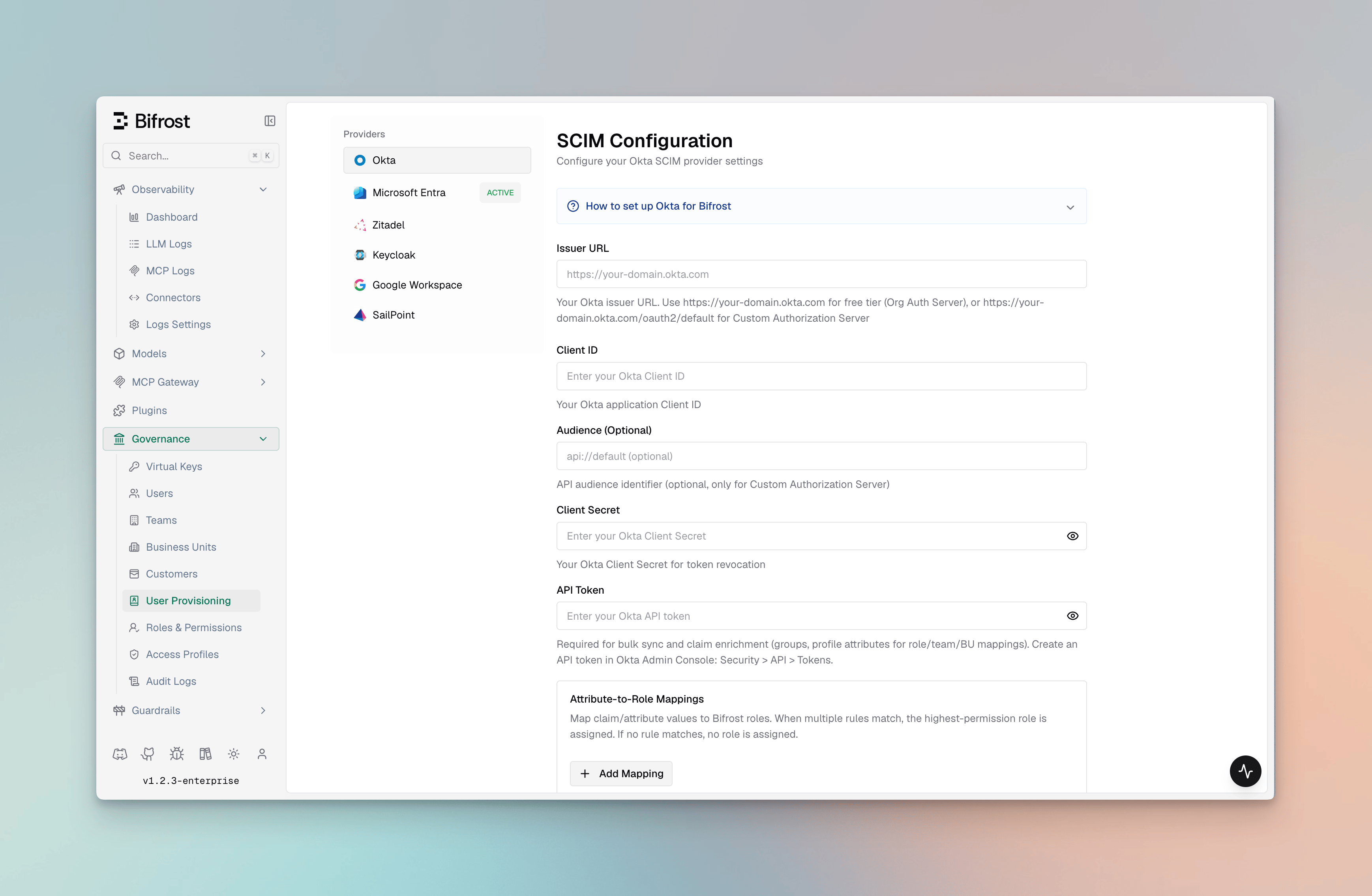
User Provisioning overview in Bifrost dashboard

Supported Identity Providers

Pick your IdP to follow a step-by-step setup guide. All providers share the same Bifrost configuration surface — the only difference is how the OAuth client and role/group claims are created on the provider side.

Okta

OIDC with Org or Custom Authorization Servers, plus group-to-role mapping and API tokens for bulk user sync and 24-hour background reconciliation.

Microsoft Entra

Entra ID (Azure AD) with app roles, group claims, and v1.0 / v2.0 token support.

Keycloak

Self-hosted or managed Keycloak with OIDC login and Admin REST API based user provisioning.

Zitadel

Cloud or self-hosted Zitadel with project-scoped role claims and service-account-based provisioning.

Google Workspace

Google Workspace domains with OAuth login plus optional Directory API sync via a service account.

How it works

OIDC authentication and provisioning flow
  1. Login — Bifrost redirects unauthenticated users to the provider’s authorization endpoint (Authorization Code flow).
  2. Token exchange — on callback, Bifrost exchanges the code for an access token and refresh token, stores them in an HttpOnly cookie / server session, and validates the JWT against the provider’s JWKS.
  3. Identity extraction — configurable JWT claims (userIdField, rolesField, teamIdsField) are mapped to a Bifrost user, role, and teams. Provider-specific app roles or custom attributes override claim lookup.
  4. Attribute mapping — optional attributeRoleMappings, attributeTeamMappings, and attributeBusinessUnitMappings translate arbitrary claim values (e.g., a department string or Okta group name) into Bifrost roles, teams, or business units.
  5. Session refresh checks — every 15 minutes, Bifrost refreshes the OIDC session. If the session cannot be refreshed, Bifrost checks with the OIDC server whether the user is still active.
  6. Background reconciliation — Bifrost periodically calls the configured provider’s directory APIs to reconcile imported users and mapped roles, teams, and business units.
  7. Bulk import — admins can preview users matching a filter and bulk-import them via the dashboard, which calls the provider’s user directory API.
  8. Daily sync — Bifrost reconciles imported users every 24 hours.
  9. SCIM push — IdPs configured with a SCIM provisioning connector can push user creates, updates, and deletes to Bifrost in real time via /scim/v2.
  10. Decommissioning — if the OIDC server reports that a user is no longer active, the 24-hour reconciliation no longer finds them in the active source set, or a SCIM DELETE arrives, Bifrost decommissions that user locally.

Capabilities

CapabilityDescription
OAuth 2.0 / OIDC SSOAuthorization Code + PKCE with configurable scopes (openid profile email offline_access).
JWKS validationJWTs are validated against the provider’s published JWKS keys; configuration is cached and auto-refreshed.
Role mappingMap from a claim value (string or array) to Admin / Developer / Viewer or a custom role. Highest-privilege wins when multiple match.
Team mappingMap multiple claim values to Bifrost teams in a single pass (a user can belong to many teams).
Business unit mappingSame as team mapping but scoped to business units.
Provisioning previewPreview up to 50 users matching filters (groups, roles, departments) before importing.
Bulk importImport matched users into Bifrost with role + team + BU assignments applied.
Team syncSync IdP groups as Bifrost teams with a single action.
Business unit syncSync IdP organizational units as Bifrost business units.
Inbound SCIM 2.0IdPs push user and group changes to Bifrost via /scim/v2 in real time. Bearer-token authenticated.
SCIM attribute mappingSCIM user attributes (including enterprise extension fields) drive role, team, and BU assignments automatically on every SCIM write.
DeprovisioningBifrost checks user status during each 15-minute OIDC session refresh and reconciles imported users against the provider directory every 24 hours. SCIM DELETE/deactivation (active: false) is also handled immediately. Users that are inactive, disabled, unassigned, or missing from the source set are decommissioned locally.
API key pass-throughRequests using Bifrost API keys (bfst-*) bypass OIDC user-provisioning middleware so inference traffic is not affected.

Background lifecycle reconciliation

Bifrost’s lifecycle model combines source-side reconciliation, OIDC session validation, and real-time SCIM push. Every 15 minutes, Bifrost refreshes active OIDC sessions. If a session cannot be refreshed, Bifrost checks with the OIDC server whether the user is still active; if the provider reports the user is inactive, Bifrost decommissions that user locally. After users are imported, Bifrost also uses the configured provider credentials to sync with the IdP in the background every 24 hours. That sync updates mapped roles, teams, and business units, and decommissions imported users that are disabled, unassigned, or no longer present in the provider source set. When an IdP SCIM connector is configured, user deactivation and deletion are also handled immediately as the IdP pushes changes.

Configuration reference

All providers share the same outer config shape in config.json:
{
  "scim_config": {
    "enabled": true,
    "provider": "okta | entra | zitadel | keycloak | google | sailpoint",
    "config": {
      "...": "provider-specific fields - see each IdP guide"
    }
  }
}
Shared fields across providers:
FieldRequiredDescription
clientIdYesOAuth client ID from the identity provider.
clientSecretUsuallyClient secret. Required for confidential clients and (where applicable) token revocation.
audienceOptionalJWT audience to validate against. Defaults vary per provider.
attributeRoleMappingsOptionalOrdered list of { attribute, value, role } rules evaluated top-to-bottom.
attributeTeamMappingsOptionalList of { attribute, value, team, attributeType, attributeValue } rules (all matches apply).
attributeBusinessUnitMappingsOptionalList of { attribute, value, businessUnit, attributeType, attributeValue } rules (all matches apply).
Provider-specific fields (domain, tenant ID, server URL, service-account credentials) are documented in each IdP’s setup guide.
Changing scim_config at runtime through the UI is applied after saving. For file-based configuration, restart the Bifrost server to pick up changes.

Environment variable support

Fields marked env.* supported accept "env.VAR_NAME" in addition to a literal value — Bifrost resolves the variable from the process environment at startup. Attribute mapping arrays are always plain JSON (they cannot reference env vars).

Okta

FieldJSON keyRequiredenv.* supportedNotes
Issuer URLissuerUrlYesYesOrg server: https://domain.okta.com; Custom: …/oauth2/default
Client IDclientIdYesYesApplication Client ID
Client SecretclientSecretNoYesRequired for token revocation
API TokenapiTokenNoYesRequired for bulk user sync, team sync, and 24-hour Okta background reconciliation
AudienceaudienceNoYesOnly applies to Custom Authorization Server
Team IDs fieldteamIdsFieldNoYesJWT claim for group IDs (default: "groups")
Role mappingsattributeRoleMappingsNoPlain onlyArray of { attribute, value, role } objects
Team mappingsattributeTeamMappingsNoPlain onlyArray of { attribute, value, team, attributeType, attributeValue } objects
Business unit mappingsattributeBusinessUnitMappingsNoPlain onlyArray of { attribute, value, businessUnit, attributeType, attributeValue } objects

Microsoft Entra ID

FieldJSON keyRequiredenv.* supportedNotes
Tenant IDtenantIdYesYesAzure tenant ID or "common" for multi-tenant
Client IDclientIdYesYesApplication (client) ID
Client SecretclientSecretYesYesClient secret for OAuth authentication
CloudcloudNoYes"commercial" (default) | "gcc-high" | "dod"
AudienceaudienceNoYesJWT audience override (default: clientId)
App ID URIappIdUriNoYesApp ID URI for v1.0 tokens (e.g. api://{clientId})
Team IDs fieldteamIdsFieldNoYesJWT claim for group IDs (default: "groups")
Role mappingsattributeRoleMappingsNoPlain onlyArray of { attribute, value, role } objects
Team mappingsattributeTeamMappingsNoPlain onlyArray of { attribute, value, team, attributeType, attributeValue } objects
Business unit mappingsattributeBusinessUnitMappingsNoPlain onlyArray of { attribute, value, businessUnit, attributeType, attributeValue } objects

Keycloak

FieldJSON keyRequiredenv.* supportedNotes
Server URLserverUrlYesYesBase URL, e.g. https://keycloak.company.com (no /realms/…)
RealmrealmYesYese.g. "master" or "my-app"
Client IDclientIdYesYesApplication client ID
Client SecretclientSecretNoYesFor confidential clients
AudienceaudienceNoYesJWT audience for token validation
Team IDs fieldteamIdsFieldNoYesJWT claim for group IDs (default: "groups")
Role mappingsattributeRoleMappingsNoPlain onlyArray of { attribute, value, role } objects
Team mappingsattributeTeamMappingsNoPlain onlyArray of { attribute, value, team, attributeType, attributeValue } objects
Business unit mappingsattributeBusinessUnitMappingsNoPlain onlyArray of { attribute, value, businessUnit, attributeType, attributeValue } objects

Zitadel

FieldJSON keyRequiredenv.* supportedNotes
DomaindomainYesYese.g. "my-instance.zitadel.cloud" or "auth.company.com"
Client IDclientIdYesYesApplication client ID
Client SecretclientSecretNoYesFor confidential clients
Project IDprojectIdNoYesFor project-scoped role claims
AudienceaudienceNoYesAccess-token audience override
Service account client IDserviceAccountClientIdNoYesService account for provisioning API access
Service account client secretserviceAccountClientSecretNoYesService account secret
Team IDs fieldteamIdsFieldNoYesJWT claim for group IDs
Role mappingsattributeRoleMappingsNoPlain onlyArray of { attribute, value, role } objects
Team mappingsattributeTeamMappingsNoPlain onlyArray of { attribute, value, team, attributeType, attributeValue } objects
Business unit mappingsattributeBusinessUnitMappingsNoPlain onlyArray of { attribute, value, businessUnit, attributeType, attributeValue } objects

Google Workspace

FieldJSON keyRequiredenv.* supportedNotes
DomaindomainYesYesGoogle Workspace domain (e.g. "company.com")
Client IDclientIdYesYesGoogle OAuth2 client ID
Client SecretclientSecretNoYesFor token revocation
Credential modecredentialModeNoYes"inherit" (ADC) | "env" | "file"
Service account JSONserviceAccountJsonNoYesRaw service account JSON string
Service account env varserviceAccountEnvVarNoYesEnv var containing the service account JSON
Service account fileserviceAccountFileNoYesPath to the service account JSON key file
Admin emailadminEmailConditionalYesRequired for Directory API / domain-wide delegation
Impersonate service accountimpersonateServiceAccountNoYesGCP SA email to impersonate when using ADC + Workload Identity
AudienceaudienceNoYesOptional JWT audience override
Team IDs fieldteamIdsFieldNoYesClaim field for group IDs (default: "groups")
Role mappingsattributeRoleMappingsNoPlain onlyArray of { attribute, value, role } objects
Team mappingsattributeTeamMappingsNoPlain onlyArray of { attribute, value, team, attributeType, attributeValue } objects
Business unit mappingsattributeBusinessUnitMappingsNoPlain onlyArray of { attribute, value, businessUnit, attributeType, attributeValue } objects

Configuring from the dashboard

  1. Navigate to Governance → User Provisioning in the Bifrost dashboard.
  2. Select your identity provider from the OIDC Provider dropdown.
  3. Fill in the provider-specific fields. Required fields are marked and validated on Verify.
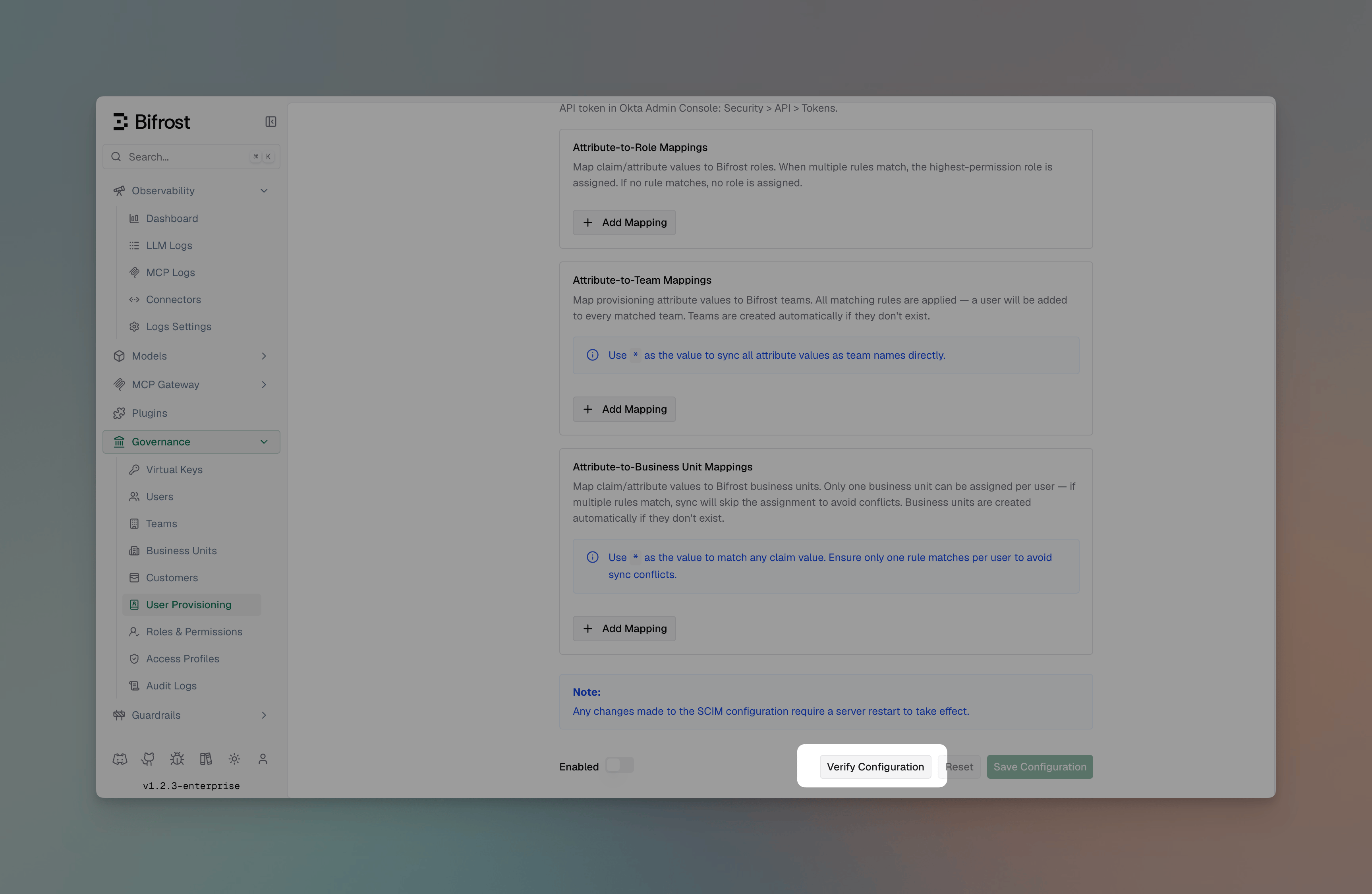
Selecting an OIDC provider in the Bifrost dashboard
  1. Click Verify to test credentials end-to-end. Bifrost will reach the provider’s JWKS / directory endpoint and report any failures.
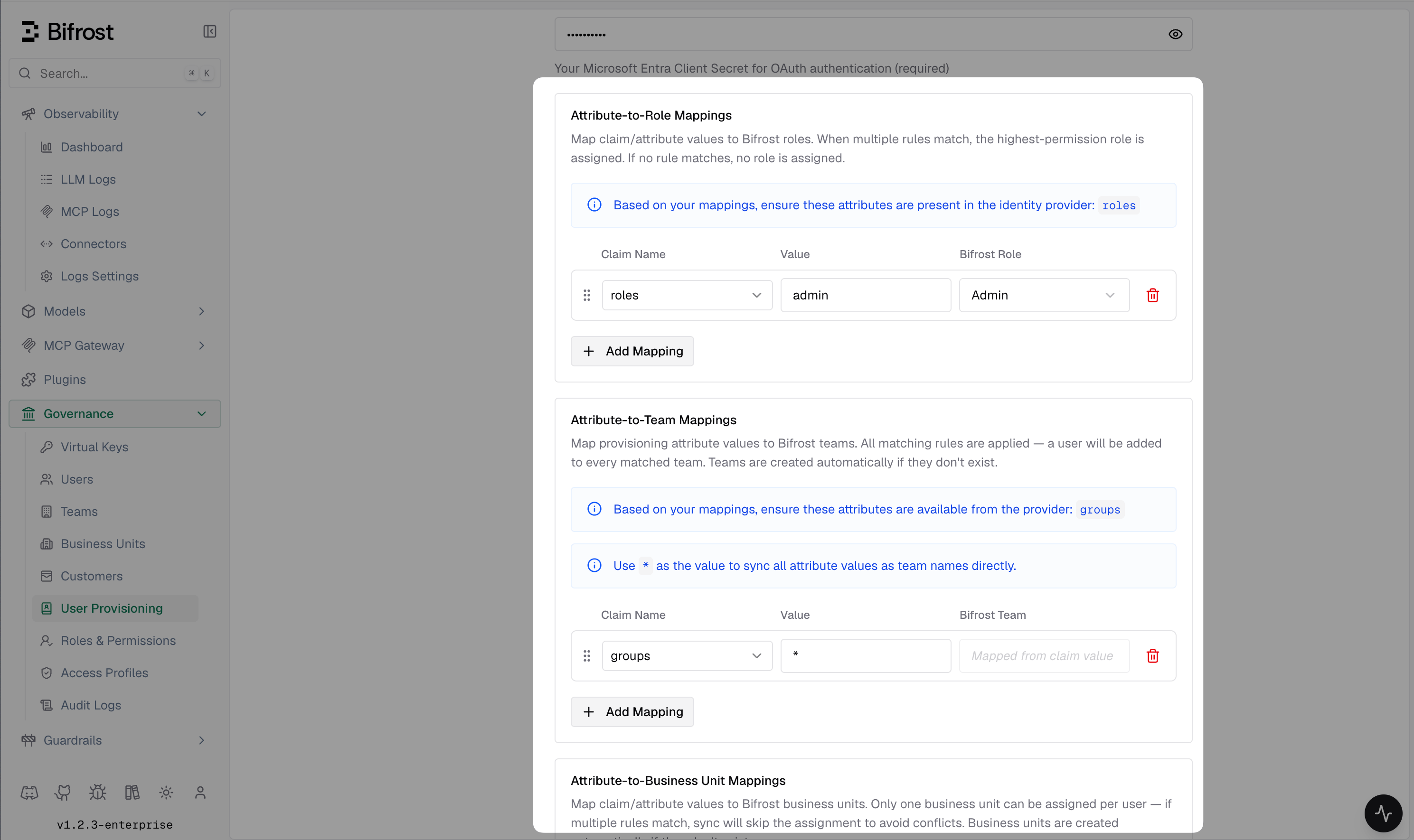
  2. Configure Attribute → Role / Team / Business Unit mappings as needed.
  3. Toggle Enabled and click Save Configuration.
After enabling a new provider, the next dashboard load redirects to your IdP for login. Test in an incognito window first to avoid being locked out of your current session.

Attribute mappings

Attribute mappings let you translate claim values into Bifrost roles, teams, or business units without forcing your IdP admins to restructure claim names.
Preview of users matching an import filter
Each mapping is an ordered rule:
{
  "attribute": "department",
  "value": "Engineering",
  "role": "developer"
}
Rules are evaluated top-to-bottom:
  • Role mappings — first match wins. Set a fallback with "value": "*" at the end.
  • Team mappings and business unit mappings — all matching rules apply, so a user with department=Platform and group=sre can be placed on multiple teams.
Claim values can be strings, arrays, or nested objects — Bifrost resolves dotted paths (e.g., realm_access.roles).

attributeType field

Team and business unit mappings have an optional attributeType field:
ValueMeaning
"user" (default)Match against JWT claims or SCIM user attributes (e.g. department, title).
"group"Match against the displayName of groups pushed via SCIM. Use this when your IdP pushes group membership via SCIM rather than embedding group names in the user token.
{
  "attribute": "displayName",
  "value": "platform-team",
  "team": "Platform",
  "attributeType": "group"
}
Leave attributeType unset (or "user") for all OIDC claim-based mappings.

attributeValue field

Team and business unit mappings also support an optional attributeValue field. This is the key Bifrost uses to look up the attribute in a SCIM-provisioned user’s stored profile (a flat key-value map). attribute and attributeValue serve different codepaths:
  • attribute is used for OIDC JWT claim lookup and supports dotted paths into nested objects (e.g. realm_access.roles).
  • attributeValue is used for SCIM profile lookup against the flat map stored from inbound SCIM pushes. It defaults to attribute when not set.
For standard SCIM attributes (department, title, userType, costCenter, etc.) the two values are identical, so you never need to set attributeValue — the same name works for both OIDC and SCIM paths. You only need attributeValue when a single mapping rule must cover both OIDC and inbound SCIM, and the OIDC claim path differs from the SCIM storage key — for example, a custom attribute sent under profile.jobFunction in the JWT but stored as jobFunction in the SCIM profile:
{
  "attribute": "profile.jobFunction",
  "attributeValue": "jobFunction",
  "value": "platform-engineer",
  "team": "Platform"
}
If you only use OIDC (no inbound SCIM push), attributeValue has no effect.

SCIM attribute suggestions

When configuring attribute mappings for SCIM-provisioned users, the following attributes are available from the user payload: Core attributes — sent by all SCIM-capable providers:
AttributeDescription
userNameThe user’s unique identifier (usually email) at the provider.
displayNameThe user’s display name.
titleJob title.
userTypeUser category (e.g. "Employee", "Contractor").
Enterprise extension attributes — sent by most providers via urn:ietf:params:scim:schemas:extension:enterprise:2.0:User:
AttributeDescription
departmentDepartment name.
costCenterCost center code.
organizationOrganization name.
divisionDivision name.
employeeNumberEmployee ID.
Custom extension attributes — any additional attributes sent under custom URNs are flattened and made available by their field name for use in mappings.

Inbound SCIM 2.0 provisioning

Bifrost exposes a SCIM 2.0 endpoint that identity providers can use to push user and group changes in real time, without waiting for the next 24-hour reconciliation cycle.

Base URL

https://<your-bifrost-host>/scim/v2

Authentication

All SCIM requests must include a bearer token:
Authorization: Bearer <provisioning-token>
The provisioning token is generated per SCIM provider and can be rotated from the Bifrost dashboard under Governance → User Provisioning → SCIM Settings.

How SCIM writes trigger governance updates

Every SCIM create, replace, or patch immediately re-evaluates the user’s attributeRoleMappings, attributeTeamMappings, and attributeBusinessUnitMappings against the current SCIM attributes. Changes to role, team, or business unit assignments are committed to the database and broadcast to all cluster nodes before the SCIM response is returned. Only SCIM-managed memberships are affected — any manually assigned teams or roles are preserved.

Bulk user provisioning

There are two ways to get users into Bifrost, depending on what your IdP supports: Via API token (bulk import): Providers that support a directory API (Okta, Entra, Keycloak, Zitadel, Google Workspace) allow you to preview and import users in bulk from the dashboard:
  1. Go to Governance → User Provisioning → Import Users.
  2. Select a filter — groups, roles, departments, or a custom query depending on provider support.
  3. Click Preview to see up to 50 matching users.
  4. Click Import to create them in Bifrost with role / team / BU assignments applied.
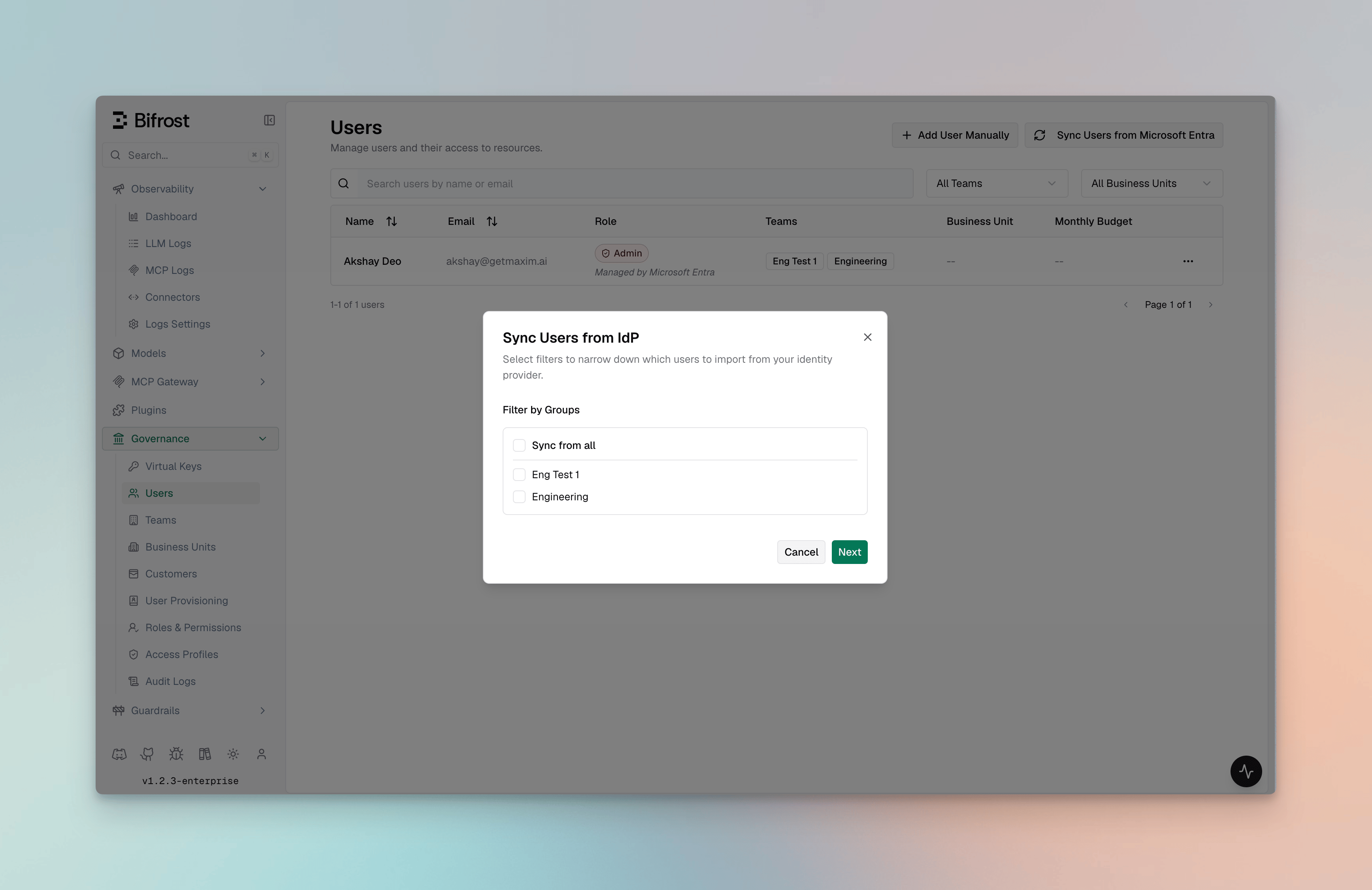
Preview of users matching an import filter
Re-running an import reconciles existing users — role and team changes in the IdP are reflected on the next import. Via SCIM push (real-time): If the IdP supports SCIM provisioning (e.g. Okta with a SCIM app), you can configure it to push users to Bifrost automatically — no manual import needed. Users are created, updated, and deactivated in Bifrost as they change in the IdP. See the Inbound SCIM 2.0 provisioning section and your IdP’s setup guide for configuration steps.

Troubleshooting

SymptomLikely cause
Access denied: no application role or group mapping is assigned to this user.Make sure you have assigned the user to the Bifrost IdP application and they have a valid group/attribute mapping to a role in Bifrost.
Redirect loop on loginMake sure you have restarted pods/Bifrost instance after changing OIDC configuration, or check for a redirect URI mismatch. Exact string match required — check trailing slashes and http vs https.
invalid audienceaudience field does not match the access token’s aud claim. Use the same value your IdP issues.
Empty roles / teamsClaim mapping is off. Verify the JWT at jwt.io and check rolesField / teamIdsField.
Token refresh failingoffline_access scope missing or refresh token revoked. Re-enable the scope and re-authenticate.
First user gets AdminBy design — if no matching role mapping applies, the first user is promoted to Admin so they can finish configuration. Subsequent users default to Viewer.
SCIM 401 UnauthorizedThe Authorization: Bearer <token> header is missing or the provisioning token has been rotated. Rotate a new token and update your IdP SCIM connector.
SCIM writes not updating teams / rolesEnsure attributeTeamMappings / attributeRoleMappings reference the correct attribute name (e.g. department, not Department). Attribute matching is case-insensitive for values but the attribute key must match exactly.
SCIM group push not placing users in teamsMake sure the relevant attributeTeamMappings entries use "attributeType": "group". Without this, group displayName is not evaluated against team mappings.
Provider-specific troubleshooting lives in each IdP’s guide.