

What Are Custom Providers?
Custom providers allow you to create multiple instances of the same base provider, each with different configurations and access patterns. The key feature is request type control, which enables you to restrict what operations each custom provider instance can perform. Think of custom providers as “multiple views” of the same underlying provider - you can create several custom configurations for OpenAI, Anthropic, or any other provider, each optimized for different use cases while sharing the same API keys and base infrastructure.Key Benefits
- Multiple Provider Instances: Create several configurations of the same base provider (e.g., multiple OpenAI configurations)
- Request Type Control: Restrict which operations (chat, embeddings, speech, etc.) each custom provider can perform
- Custom Naming: Use descriptive names like “openai-production” or “openai-staging”
- Provider Reuse: Maximize the value of your existing provider accounts
How to Configure
Custom providers are configured using thecustom_provider_config field, which extends the standard provider configuration. The main purpose is to create multiple instances of the same base provider, each with different request type restrictions.
Important: The allowed_requests field follows a specific behavior:
- Omitted entirely: All operations are allowed (default behavior)
- Partially specified: Only explicitly set fields are allowed, others default to
false - Fully specified: Only the operations you explicitly enable are allowed
- Present but empty object (
{}): All fields are set to false
- Using Web UI
- Using API
- Using config.json
- Go SDK
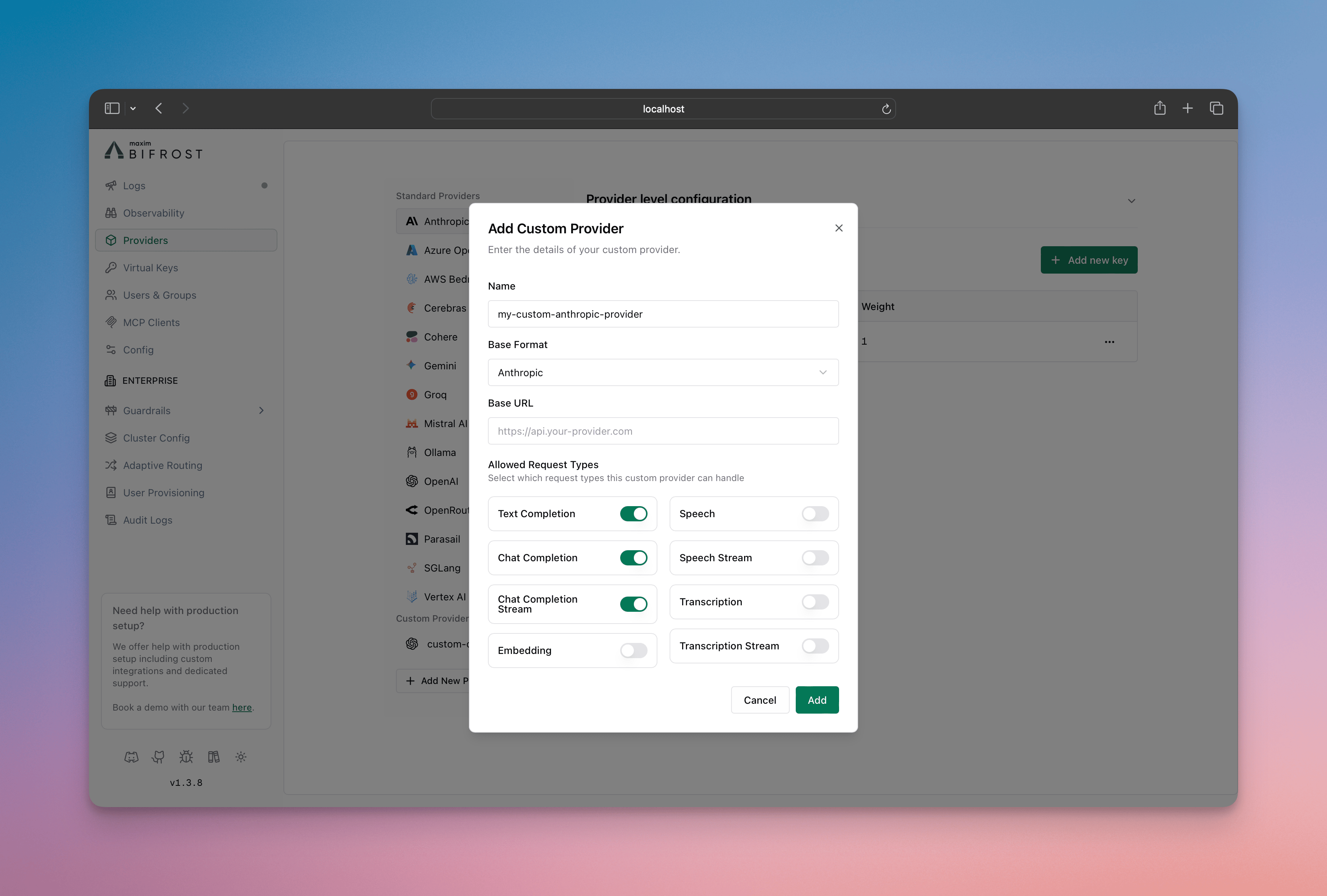
- Go to http://localhost:8080
- Navigate to “Providers” in the sidebar
- Click “Add New Provider”
- Choose a unique provider name (e.g., “openai-custom”)
- Select the base provider type (e.g., “openai”)
- Configure which request types are allowed
- Save configuration
Configuration Options
Allowed Request Types
Control which operations your custom provider can perform. The behavior is:- If
allowed_requestsis not specified: All operations are allowed by default - If
allowed_requestsis specified: Only the fields set totrueare allowed, all others default tofalse
text_completion: Legacy text completion requeststext_completion_stream: Streaming text completion requestschat_completion: Standard chat completion requestschat_completion_stream: Streaming chat responsesresponses: Standard responses requestsresponses_stream: Streaming responses requestsembedding: Text embedding generationspeech: Text-to-speech conversionspeech_stream: Streaming text-to-speechtranscription: Speech-to-text conversiontranscription_stream: Streaming speech-to-textrerank: Document reranking via/v1/rerank(OpenAI-compatible base only)decisions: Decision requests via/v1/decisions. Atypesafebase serves them natively, and so does anopenaibase for the models the datasheet markssupports_decisions(such asgpt-6-luna); other models and bases returnunsupported_operation, or are emulated through the Responses API whenconvert_decision_to_responsesis on. Leave that setting off if a custom provider serves decisions natively: the model catalog has no entries for custom providers, so with it on a decision model under an unrecognized name is diverted away from its native endpoint (why). See Self-Hosted Decision Models for Laya and Nimble
Base Provider Types
Custom providers can be built on these supported providers:openai- OpenAI APIanthropic- Anthropic Claudebedrock- AWS Bedrockcohere- Coheregemini- Geminireplicate- Replicatetypesafe- TypeSafe (decisions and model listing only; see TypeSafe)
Authentication (OAuth-minted keys)
A custom provider on theopenai base normally carries a static API key in each key’s value. Upstreams that sit behind an identity provider and issue short-lived access tokens can instead be given an oauth_key_config on the key: leave value empty and Bifrost obtains the token from the token endpoint, sends it as the bearer, caches it per credential, collapses concurrent requests onto one mint, and refreshes it a minute before it expires. A rejected credential is backed off rather than retried on every request. The same machinery serves Databricks OAuth M2M; it applies to the standard openai provider too.
Two grants are supported:
client_credentials(RFC 6749 §4.4): a client ID and secret, sent as HTTP Basic auth by default or as form fields withauth_style: "body".jwt_bearer(RFC 7523): Bifrost signs a JWT assertion (iss,sub,aud,iat,nbf,exp,jti) with your RSA or EC private key and exchanges it for a token.
value always wins, so a key can carry both while you migrate. oauth_key_config is only accepted on openai and on custom providers whose base is openai; elsewhere it is refused at configuration time rather than silently ignored.
- Using Web UI
- Using API
- Using config.json
- Open the custom provider under Providers and click Add Key
- Under Authentication Method choose OAuth (minted token)
- Pick the grant, enter the Token URL, then the client ID and secret (client credentials) or the private key, issuer and audience (JWT bearer)
- Add scopes if the identity provider needs them, then save
oauth_key_config reference
Token lifetime. Bifrost normally refreshes a token one minute before the expiry the endpoint reported. If the token already has one minute or less left when it is minted, Bifrost refreshes it halfway through its remaining lifetime (a 30-second token is re-minted after about 15 seconds). A token endpoint that returns no
expires_in is assumed to live five minutes, so such a token is re-minted roughly every four minutes.
Failures. A rejected mint is cached and retried with a backoff: 2 s doubling to 60 s for a credential or configuration fault (any 4xx other than 429), 0.5 s doubling to 10 s for a rate limit, a 5xx or an unreachable endpoint; a Retry-After from the endpoint extends the window. Separately from the backoff, fallbacks are gated by the kind of failure: a 4xx other than 429 blocks them, since another provider cannot repair a bad credential, while a 429, a 5xx or an unreachable endpoint leaves the configured fallbacks available.
Streaming Termination
Most OpenAI-compatible providers end a stream with adata: [DONE] marker, and Bifrost reads until it arrives so that a trailing usage-only chunk — which many providers send after finish_reason — is not lost.
Bifrost also ends the stream on its own, with no configuration, when an upstream omits [DONE] after finish_reason:
- the upstream closes the connection: the stream ends immediately
- the upstream keeps the connection open and sends SSE heartbeat comments: the stream ends on the second consecutive comment after
finish_reason, so a trailing usage chunk is still collected - the upstream keeps the connection open and sends nothing: the stream ends cleanly once
stream_idle_timeout_in_secondselapses, with the bufferedfinish_reason. Usage is unavailable for that request if it never arrived
does_not_send_done_marker to true when your upstream instead ends streams on finish_reason and never sends [DONE]. Bifrost then stops reading as soon as finish_reason arrives:
wait_for_usage when your upstream ends on finish_reason but still sends that trailing usage chunk. Bifrost requests it on every stream via stream_options.include_usage, so this keeps the read loop open just long enough to collect it:
wait_for_usage the stream ends on whichever comes first: the usage chunk, two consecutive heartbeat comments, the upstream closing the connection, or stream_idle_timeout_in_seconds. If your upstream may go silent without ever sending usage, set network_config.stream_idle_timeout_in_seconds low (5, say) on that provider so the last case does not hold the request for the default 120 seconds.
Request Path Overrides
Therequest_path_overrides field allows you to override the default API endpoint paths for specific request types. This is useful when:
- Connecting to custom or self-hosted model providers
- Integrating with proxies that expect specific URL patterns
- Using provider forks with modified API paths
base_url):
base_url):
When a full URL (with scheme and host) is provided in
request_path_overrides, Bifrost will use that URL directly and ignore the base_url from network_config for that specific request type. This allows you to route different request types to completely different endpoints./v1/chat/completions path, requests will be sent to https://custom-endpoint.example.com/api/v2/chat.
TLS for Self-Signed or Internal Certificates
When connecting to providers with HTTPS endpoints that use self-signed certificates or internal CAs (e.g., air-gapped environments, internal services), you can configure TLS innetwork_config:
These options are mutually exclusive. Do not set
insecure_skip_verify: true together with ca_cert_pem; provider config validation rejects that combination.
Option 1: Skip verification (air-gapped / self-signed)
Use Cases
1. Environment-Specific Configurations
Create different configurations for production, staging, and development environments:2. Role-Based Access Control
Restrict capabilities based on user roles or team permissions. You can then create virtual keys for better management of who can access which providers, providing granular control over team permissions and resource usage. This integrates seamlessly with Bifrost’s governance features for comprehensive access control and monitoring:3. Feature Testing and Rollouts
Test new features with limited user groups:Making Requests
Use your custom provider name in requests:Relationship to Provider Configuration
Custom providers extend the standard provider configuration system. They inherit all the capabilities of their base provider while adding request type restrictions. Learn more about provider configuration:Next Steps
- Fallbacks - Automatic failover between providers
- Load Balancing - Intelligent API key management with weighted load balancing
- Governance - Advanced access control and monitoring